Tantillo Squarespace Template Review
This post contains affiliate links. If you purchase through them, I may receive a small commission at no extra cost to you.
Table of Contents Show
Tantillo is a Squarespace template that brings a fun, bold, playful energy to restaurant and food business websites.
Built with burger joints, sandwich shops, and casual eateries in mind, it uses oversized typography, vibrant colors, and wavy animations to create an eye-catching, appetite-whetting first impression. If you're a restaurant owner with a fun, trendy vibe, Tantillo probably caught your eye for good reason.
This review covers what Tantillo includes, pros and cons, where it shines, and where you might hit limitations.
The goal: help you figure out if this restaurant website template is the right fit for your business or if you should keep looking.
Who the Tantillo Template Works Best For
Tantillo is designed for casual, trendy food businesses. The template's bold aesthetic and honestly fairly simple structure work best when you're focused on showcasing your menu, location, and hours without a lot of extra complexity.
Fast-casual restaurants: Burger joints, sandwich shops, and comfort food spots with creative menus and a younger target audience.
Food trucks and pop-ups: Mobile food businesses that need a simple online presence to share their location, menu, and hours.
Catering businesses with personality: Casual catering services specializing in sandwiches, BBQ, or comfort food that want a fun, approachable vibe.
Single-location eateries: Restaurants with one location that need to communicate the basics in a vibey way.
New restaurants building buzz: Startups looking for a bold first impression to get people excited about their concept.
What the Tantillo Template Is Not Best For
The Tantillo template may not be the best fit right out of the box if you:
Run a fine dining restaurant or upscale establishment that needs an elegant, refined aesthetic
Operate multiple locations and need complex navigation or location-specific pages
Want a blog or content marketing section to regularly share recipes, news, or updates
And like all free Squarespace templates, it does has some built-in constraints: fewer customization options, and unless you really customize fonts, colors, and layouts, your site will look like other Squarespace sites.
So if you're looking for something more customized right out of the gate, check out premium templates from designer studios like Big Cat Creative or Applet Studio. Or work with a Squarespace web designer who specializes in restaurantss.
What You Get With the Tantillo Template
Homepage
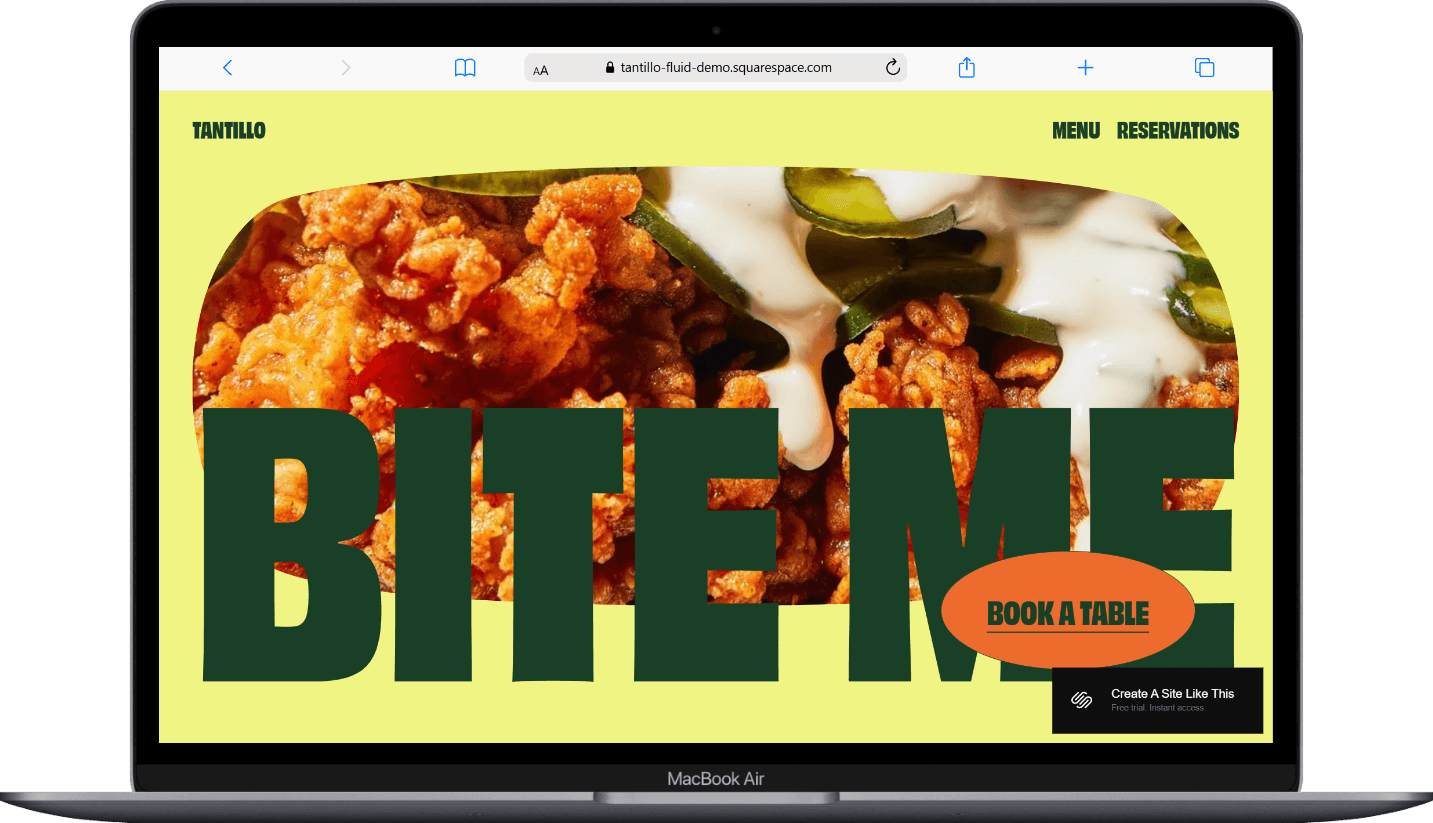
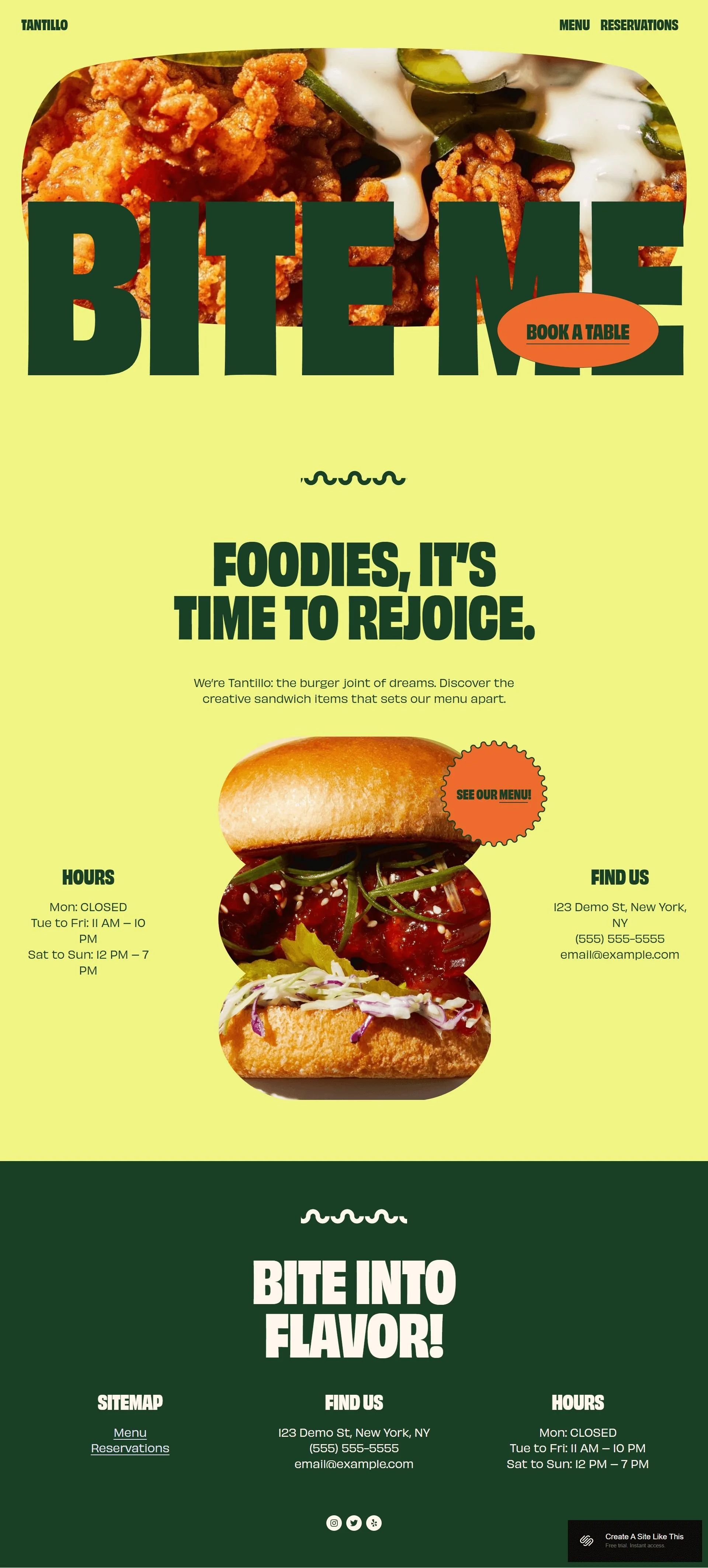
The homepage leads with oversized text and full-width food imagery that immediately grabs attention. The demo shows a burger-focused design with sections for hours, location, and contact information prominently displayed. Wavy decorative elements add playful movement throughout the page.
Menu Page
A dedicated menu page with space to organize your food and drink offerings. The layout is clean and scannable, making it easy for your guests and regulars to browse.
Reservation/Contact Page
Built-in sections for reservation functionality or contact forms, plus integration options for table booking systems.
Extras
Full-width image sections for showcasing signature dishes
Multi-column footer for hours, location, and contact details
Wavy animation elements throughout the design
Mobile-optimized layout
Social media integration options
Newsletter signup capability
Google Maps integration for location
Customizable color schemes and typography
Key Strengths of the Tantillo Template
It makes zero apologies for being LOUD
The color palette is bold. The typography is in your face. If your brand has a big personality (think: neon signs, punchy taglines, the kind of vibe that makes people say "we HAVE to go there"), this template will help amplify you.
You can dial it up or dial it down
Just because the demo looks like a party doesn't mean YOUR site has to. Want to keep the playful energy? Great. Prefer something more refined? Also totally doable. A few tweaks in Squarespace's Site Styles and you can change the whole vibe.
Strong website footer layout
The multi-column footer is surprisingly functional, giving you space to display hours, location, contact info, and social links. This means your most important details are always visible at the bottom of every page.
Best Use Cases of the Tantillo Template
1. Burger joints or sandwich shops with creative menus
If you're serving unique takes on classics — think specialty burgers, loaded sandwiches, or creative comfort food — Tantillo's bold design matches that innovative energy. The template gives you space to showcase what makes your food different while making it easy for hungry visitors to find your location and hours.
2. Food businesses targeting a younger, trend-conscious audience
The wavy animations and oversized text appeal to diners who value Instagram-worthy aesthetics and modern design. If your customers are more Gen Z than Boomers, this template speaks their visual language.
3. Single-location restaurants that need online ordering or reservations
Tantillo integrates well with booking and ordering systems, making it super easy for customers to reserve a table or place an order without leaving your site. The clear navigation ensures they can move from browsing your menu to booking in just a couple of clicks.
4. Catering businesses with a casual, personality-driven brand
If you cater events with BBQ, sandwiches, mac and cheese, or comfort food and want your website to reflect your fun, approachable vibe, Tantillo delivers. The template gives you space to showcase your menu offerings while maintaining that casual-but-professional balance.
5. New restaurants that need to launch quickly
Because the structure is fairly simple and dare I say basic, and the demo content is already restaurant-focused, you can get up and running fast. Replace the images, update your menu and contact info, and you're basically done and ready to launch in a weekend.
Getting Started with the Tantillo Template is Easy:
Once you pick Tantillo in the Squarespace 7.1 template library, here's what to do:
Replace the hero image and headline. Swap out the burger imagery with photos of your signature dishes. Update the oversized text to match your restaurant name and tagline. This’ll set the visual tone for your entire site.
Update your menu page. Replace the demo menu items with your actual offerings. Organize them into clear categories (appetizers, mains, drinks, etc.) and include prices.
Add your location and contact information. Update the footer with your address, phone number, email, and hours. Connect Google Maps so people can easily find you.
Set up reservation or ordering integration. If you use OpenTable, Resy, or another booking system, add those integrations. For online ordering, connect your preferred service (Toast, ChowNow, etc.) to the reservation button.
Customize colors and fonts in Site Styles. Go to Design > Site Styles to adjust the color palette and typography. If the bold demo colors aren't your vibe, you can tone them down while keeping the template's structural strengths.
Check your heading hierarchy. Squarespace templates don't always include proper heading structure by default, so make sure your main headline is an H1 and subheadings follow logical order (H2, H3, etc.). This matters for both SEO and accessibility.
Add your social media links. Connect your Instagram, Facebook, and any other social accounts.
Upload additional food photography. Replace all demo images with high-quality photos of your actual dishes, interior, and atmosphere.
Set up your contact form. Customize the contact form for inquiries, special requests, or private event bookings. Make sure form submissions go to an email address you check regularly.
Double check everything, connect your domain and choose your Squarespace plan, and go live. Review every page on mobile and desktop, test all forms and links, then publish your site!
Tantillo Squarespace Template FAQs
Is the Tantillo template good for SEO?
Yes. Tantillo has the same SEO capabilities as all Squarespace templates. The foundations are all there. But keep in mind, Squarespace doesn't build in proper heading hierarchy by default, so you'll need to manually ensure your Header tags are structured correctly. You'll also need to write meta descriptions, alt text for images, and create SEO-friendly URLs. The template itself won't hurt your SEO, but it won't automatically help it either.
Can I use the Tantillo template on mobile?
Absolutely. Like all Squarespace templates, Tantillo is fully mobile-responsive and looks great on phones and tablets.
Can I change fonts and colors on the Tantillo template?
Yes, easily. Squarespace's Site Styles editor lets you customize colors, fonts, spacing, shapes, and other design elements without touching code. If you want to tone down the bold colors in the demo or switch to different typography, you can do that in just a few clicks.
Does Tantillo work for coffee shops or cafes?
It can work, but it depends on your vibe. If you run a trendy, modern cafe with a bold personality, Tantillo could fit well. However, if you want a more refined or cozy atmosphere, you might be better served by other templates that have a softer aesthetic. The key is whether the bold, playful design matches your brand.
Can I add a blog to the Tantillo template?
Yes, you can add a blog page to any Squarespace template. But, Tantillo's demo doesn't include blog-specific layouts, so you'll be starting from scratch on that page. If regular content creation is important to your strategy, consider whether you want a template that already has blog layouts built in.
Does the Tantillo template support multiple locations?
Not really. The template is structured for a single location with one set of hours and contact information. If you operate multiple locations, you'd need to add custom pages and navigation, which means more setup work.
Is Tantillo good for food trucks?
Yes, Tantillo can work well for food trucks. The simple structure makes it easy to update your location and hours.
Can I integrate online ordering with Tantillo?
Yep, Squarespace supports integrations with popular ordering systems like Toast, ChowNow, and others. You can connect these to your reservation button or add dedicated ordering sections. Just keep in mind you'll need to set up those third-party services separately; Squarespace doesn't provide built-in ordering functionality.
View Tantillo Demo
Ready to see Tantillo in action? Check out the demo.
Take your time clicking through the pages, testing the mobile view, and imagining your own content in place of the demo. The demo gives you a solid sense of the template's personality and structure.
Ready to Give Squarespace a Try?
If Tantillo feels like the right fit for your restaurant or food business, you can get started with Squarespace here. Squarespace offers a free trial, so you can test out the template with your own content before committing. This lets you see exactly how it works with your menu, photos, and brand before you go live.