7 Best Squarespace Templates for Nonprofits (2026)
This post contains affiliate links. If you purchase through them, I may receive a small commission at no extra cost to you.
Table of Contents Show
For those who are running a nonprofit, foundation, or charitable organization, and you need a website, you’re going to want one that explains your mission, makes it easy for people to get involved, and looks professional.
And if you don’t want to spend a much of money, the good news is that Squarespace has tons of templates that work well for nonprofits.
The challenge, though, is that with almost 200 templates to choose from, it can be hard to find what you’re looking for.
That’s why I combed through all 194 of Squarespace’s free built-in templates to find the ones that fit how nonprofits work, with space for things like your mission, programs, team, impact stories, and donation pages.
These seven templates make it easier to get started because the basic structure is already there. You won't have to figure out where to put your donation page, how to showcase your programs, or how to organize multiple initiatives.
All these templates are free with any Squarespace subscription and built on Squarespace 7.1. You can customize colors, fonts, and layouts to match your brand without touching any code.
Let’s get into it.
1. Bennie
Best for: Summer camps, youth programs, educational nonprofits
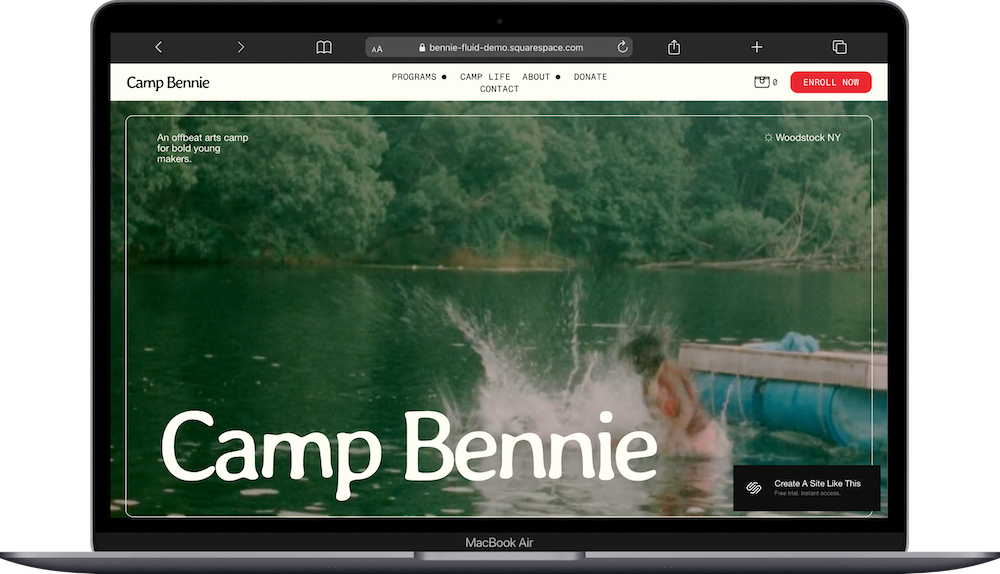
Bennie is designed as a camp template, but don't let that limit you. The setup works well for any nonprofit focused on programs, workshops, or educational work.
The template includes pages for programs (with three subpages for different offers), camp life (which you could use for community impact or how your organization works), about pages, a donate page, and contact. The demo shows a clean, outdoorsy look with full-width images and a bright red "Enroll Now" button that you can easily change to "Donate Now" or "Get Involved."
What makes Bennie useful is how it organizes programs. If your nonprofit runs multiple initiatives or serves different groups, the built-in program structure helps you show everything clearly without overwhelming visitors.
2. Organic Matter
Best for: Environmental nonprofits, sustainability initiatives, farming collectives
Organic Matter is part of Squarespace's Collaboration Collection, a special series of templates designed with artists and creatives. (If you want to explore more unique, artist-inspired designs, check out the other Collaboration Collection templates here.)
The Organic Matter template has an earthy, artistic look with illustrative elements and a simple three-page setup: Home, Our Mission, and Donate. It's minimalist in a funky way, making it great for organizations that want to tell a focused story without needing lots of pages.
The demo uses warm tones and hand-drawn illustrations, giving it a grassroots, community-focused feel. If your nonprofit centers around environmental work, sustainable farming, or community efforts, Organic Matter does this well and will be a breeze to get set up.
3. Lusaka
Best for: Education-focused nonprofits, international development foundations, project-based organizations
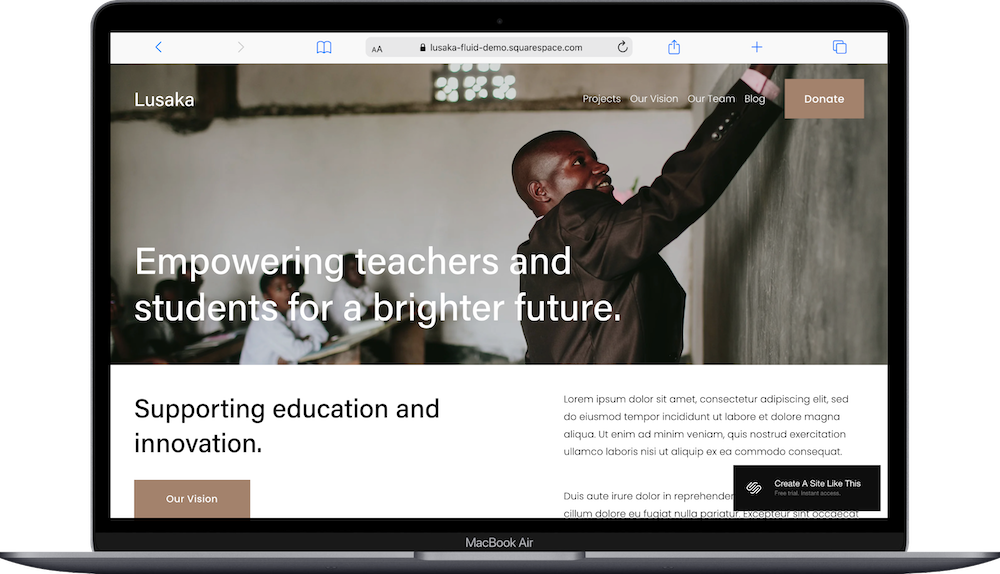
Lusaka is built for nonprofits that run different projects or initiatives. This is the Squarespace template I’d recommend for most nonprofits and foundations; it’s robust, easy to customize, and literally built for the industry.
The template includes pages for Projects (with three subpages), Our Vision, Our Team, Blog, and Donate.
The demo features warm, human-centered imagery and a clean layout that puts your mission front and center. The project pages make it easy to showcase different programs or initiatives separately, which works well if you're doing work across multiple communities or focus areas.
One bonus: Lusaka includes a blog, which is great if you want to share updates, stories from the field, or impact reports. Not all nonprofit templates include blog features out of the box, so this is helpful if content marketing is part of your strategy.
4. Roseti
Best for: Community gardens, food cooperatives, neighborhood organizations, community-building nonprofits
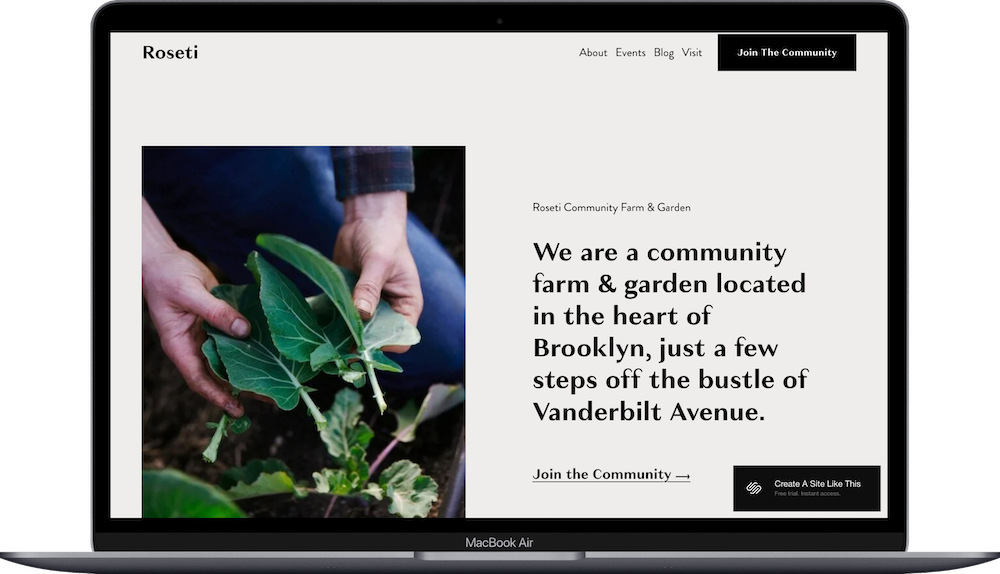
Roseti is designed for community-focused orgs, like community gardens or nonprofit centers. The template includes pages for Home, About, Events, Blog, Visit, and Join the Community.
The demo features a community farm and garden with warm, hands-on imagery. What makes Roseti work well for nonprofits is the "Join the Community" call-to-action, which you can easily change to "Donate," "Become a Member," or "Support Us."
The events page is helpful if your organization hosts workshops, community gatherings, volunteer days, or fundraising events. The blog gives you space to share stories, updates, and impact reports.
Roseti's design feels welcoming, and grassroots without looking amateur. If your nonprofit centers around community building, local action, or bringing people together, this template would be a great foundation.
5. Clarkson
Best for: Environmental foundations, conservation groups, advocacy organizations
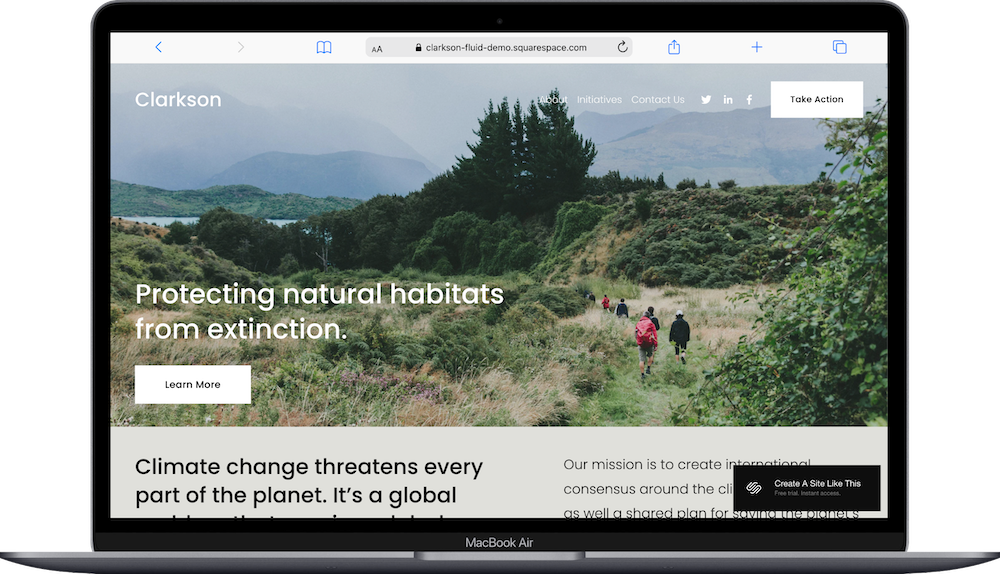
Clarkson is designed for foundations and nonprofits with a focus on outdoor action. The template includes pages for About, Initiatives, Contact Us, and Take Action (which includes both Volunteer and Donate options).
The demo uses outdoor imagery and a calm, purposeful design. What I like about Clarkson is that it frames donation as part of a broader "Take Action" approach, which can feel more engaging than just asking for money. You're inviting people into your work.
Clarkson’s setup naturally supports initiatives like volunteer opportunities, advocacy campaigns, and/or multiple ways for people to get involved. A great start for a wide array of foundations and nonprofits.
6. Malone
Best for: Animal rescues, adoption organizations, cause-based nonprofits with team spotlights
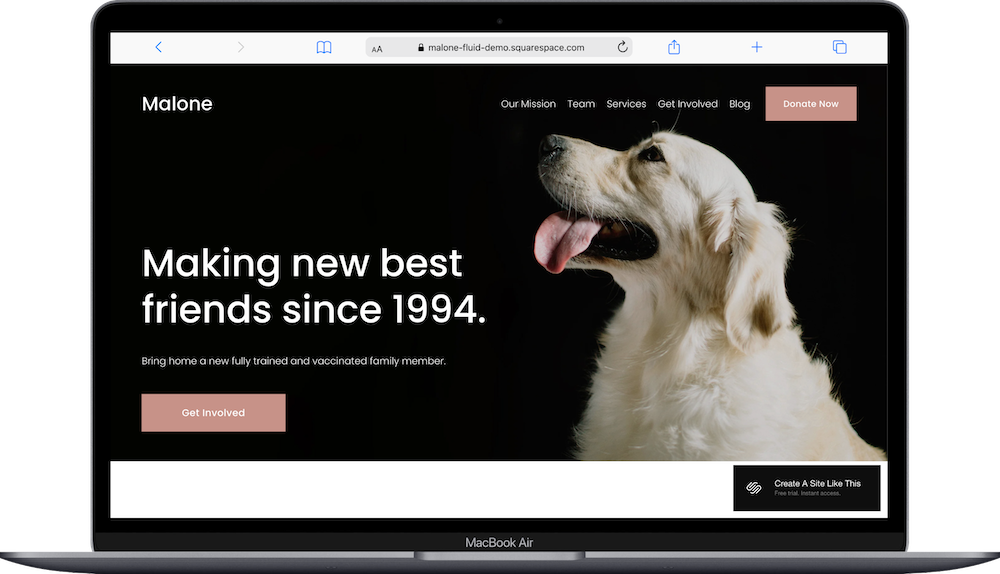
Ahhhh this one is too cute. Malone is set up for animal adoption nonprofits, but the format works for really any organization that wants to highlight individuals, stories, or beneficiaries.
The template includes pages for Our Mission, Team, Services, Get Involved, Blog, and Donate. The demo features a black background with bold animal pics, which creates an attention-grabbing design.
The team page can be repurposed to showcase your staff, board members, volunteers, or even the people or animals your organization serves. The blog is a bonus if you want to share success stories, updates, or educational content.
Malone's design is modern and bold. If you want your nonprofit to feel bold and professional, or if you have an animal adoption agency or anything related to animal nonprofits, this is the template to choose.
7. Euclid
Best for: Conservation nonprofits, land trusts, environmental foundations
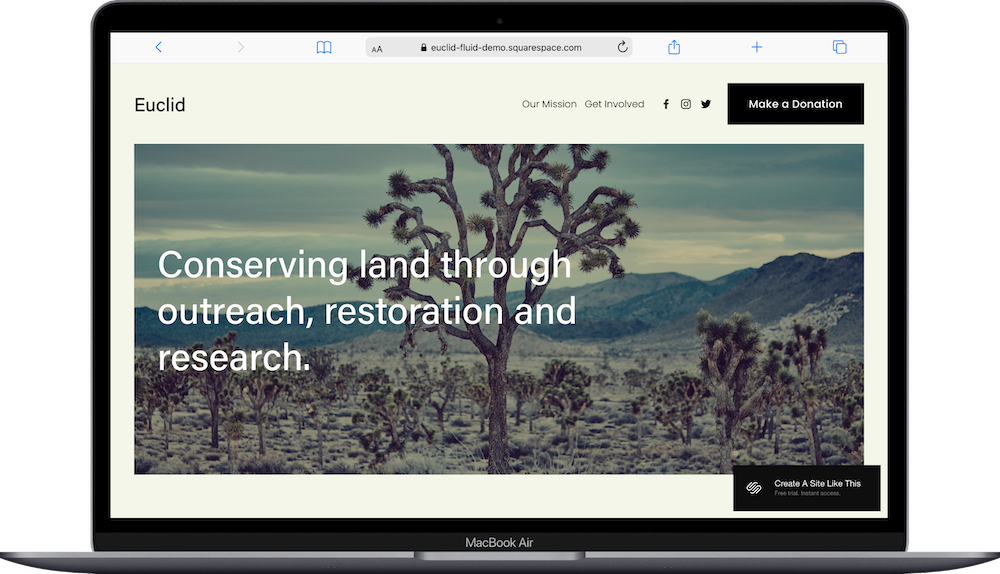
Last but certainly not least, Euclid is the most streamlined template on this list. It includes four pages: Home, Our Mission, Get Involved, and Make a Donation.
The demo features natural imagery and a clean, simple layout. If your nonprofit doesn't need lots of pages and you want visitors to focus on your mission and how to donate, Euclid keeps things straightforward.
The Euclid template works especially well for smaller organizations, single-issue campaigns, or foundations that don't need to do lots of explaining of multiple programs or services.
Squarespace’s Free Built-In Templates: What’s the Deal
All Squarespace templates are included with your subscription at no extra charge. There's no free plan to publish a live website, but Squarespace offers a 14-day free trial so you can test out templates before committing.
When people talk about "free" Squarespace templates, they mean the templates included with your paid subscription. You're not paying per template; you pick a plan, and you get access to the entire template library.
(This is different than the Squarespace templates created by web designers and sold, typically for $150-$450 USD).
Squarespace pricing for websites:
Basic Plan ($16/month annually) - Good for artists and creators who need a simple online presence
Core Plan ($23/month annually) - Best option for service-based businesses and solopreneurs
Plus Plan ($39/month annually) - For businesses selling products online
Advanced Plan ($99/month annually) - For larger e-commerce businesses with high sales volume
All plans include SSL security, hosting, 24/7 customer support, and access to all templates.
Read more: Squarespace Plans & Pricing

How to Choose the Right Template for Your Nonprofit
Think about what your organization needs before picking a template.
If you run multiple projects or programs, you'll want something like Lusaka or Bennie hat has built-in structure for flexibility in sharing different initiatives. If you're a smaller organization or just getting started, Euclid is a great choice. If you’re a creative or artistic nonprofit, Organic Matter is the best option.
Think about how you communicate too. Do you host events regularly, or have a strong community focus? Roseti. Do you focus on volunteer engagement as much as donations? Clarkson. Want to highlight team members or success stories? Malone would actually be a good choice.
And remember: these templates are designed for specific uses (camps, pets, community gardens), but that's just the demo content. You can customize any of them to fit your organization and needs. The important part is that the basic structure is already there, saving you setup time.
BTW, these are all free templates. So if you want something a little more premium, try a premium template (Big Cat Creative and Applet Studio are two of my favorite template shops), and if you something a little more custom, consider hiring a web designer.
Getting Started with Your Nonprofit Squarespace Template
Here's how to get started with any of these Squarespace templates:
Click the template link to see the full demo and make sure it fits your vision.
Sign up for Squarespace if you haven't already; you get a free 14-day trial to test everything.
Select your template when you create your site.
Replace demo content with your organization's mission, programs, and impact stories.
Customize colors and fonts in Site Styles to match your brand.
Set up your donation page & functionality by connecting to a payment processor or donation platform.
Add team bios, program details, and any other content your organization needs.
Test the donation flow to make sure it works smoothly.
Check everything on mobile before launching.
Go live by connecting your domain and choosing your Squarespace plan.
Which Nonprofit Template Should You Use?
Still not sure? Here's the quick version:
Environmental or sustainability focus? Organic Matter, Clarkson, or Euclid
Community-focused or neighborhood organization? Roseti
Want to highlight team or beneficiaries? Malone
Need events or community page? Roseti
Want something simple and focused? Euclid or Organic Matter
Creative or artistic functionality? Organic Matter
Looking for bold, modern design? Malone
All of these templates are free, fully customizable, and mobile-responsive. Pick the one that feels closest to your organization's personality and setup, then make it your own.
Squarespace Nonprofit Template FAQs
Is Squarespace good for nonprofits?
Yes. Squarespace is a solid choice for nonprofits because it offers professional-looking templates, built-in donation features, mobile responsiveness, and an easy-to-use interface. You don't need technical skills to build and maintain your site. Squarespace also integrates seamlessly with popular donation processors & email marketing tools.
Is Squarespace still good in 2026?
Yes. Squarespace continues to be one of the leading website builders in 2026, with regular updates to its features, templates, and tools. The 7.1 platform gives you flexibility and customization options that keep improving. For nonprofits specifically, Squarespace remains competitive with other website builders in terms of ease of use, design quality, and built-in features.
What is the best website builder for a nonprofit organization?
It depends on your needs, but Squarespace, WordPress, and Wix are the most popular options. Squarespace works well if you want a professional design without technical complexity. WordPress offers more flexibility but requires more technical knowledge. Wix is beginner-friendly but can feel limiting as you grow. For most small to medium nonprofits that want a professional site without hiring a developer or designer, Squarespace is a strong choice.
Do nonprofits get discounts on Squarespace?
Squarespace does not offer automatic nonprofit discounts. But you can use their 14-day free trial and use my affiliate link to receive a 10% discount when you pay annually. Some nonprofits have had success reaching out to Squarespace support directly to ask about discounts, though this isn't guaranteed. If budget is tight, look for promotional codes or consider starting with a lower-tier plan and upgrading as needed.
Can I accept donations on any Squarespace template?
Absolutely. You can easily add donation features to any Squarespace template using payment blocks or integrations with platforms like Stripe, PayPal, or other dedicated donation processors. That said, these seven Squarespace templates make it easier because the donate button and page setup are already built in. You won't have to figure out where to add it or how to make it prominent.
Can I customize the donation page on these templates?
Yes. You can change the text, images, colors, and layout of the donation page just like any other page on your site. You can also add custom forms, impact statements, or donor recognition sections.
Are these templates good for SEO?
Yes. All Squarespace 7.1 templates are built with the same underlying structure, which means they all have the same (solid) SEO capabilities. You'll want to make sure you're using proper heading hierarchy (H1 for your main headline, H2 for sections, etc.), writing clear page titles and meta descriptions, and creating quality content.
Are these templates mobile-friendly?
Yes. All Squarespace templates are fully responsive and will automatically adjust to look good on phones and tablets. Just make sure to preview your site on mobile before launching to check that images and text are displaying the way you want and spacing isn’t wonky.
Can I add a blog to templates that don't include one?
Yes. You can add a blog to any Squarespace template. Lusaka, Roseti, and Malone already include blog pages in their demo, but you can add one to Bennie, Organic Matter, Clarkson, or Euclid if you want to share updates and stories.
Which squarespace template is best for animal rescue organizations?
Malone is designed specifically for animal adoption, so it's the natural choice. That said, you could adapt Bennie (great for showcasing different programs or animal types) or Lusaka (good for highlighting individual rescue stories or projects) to work well for animal rescue too.
Can I switch templates later if I change my mind?
On Squarespace 7.1, all templates share the same underlying structure, so you don't technically "switch" templates. Instead, you redesign within the same framework by changing Site Styles, layouts, and page structures. This gives you flexibility without losing your content.
What's the difference between Clarkson and Euclid for environmental nonprofits?
Clarkson has more pages and structure, including an Initiatives page and separate Volunteer and Donate options under "Take Action." Euclid is more streamlined with just four pages total. Choose Clarkson if you have multiple programs or want to emphasize volunteer opportunities alongside donations. Choose Euclid if you want something simple and direct.
Do these templates work for fundraising campaigns?
Yes. While they're designed for ongoing nonprofit operations, you can adapt any of them for a specific fundraising campaign. You might want to simplify the structure and make the donation page even more prominent, but the foundation is there.
Ready to give Squarespace a try?
Start your free 14-day trial and get 10% off your first year when you're ready to go live.
All of these templates are free with any Squarespace subscription. Pick the one that matches your organization's needs, customize it to tell your story, and make it easy for supporters to contribute to your cause.