Kusa Squarespace Template Review
This post contains affiliate links. If you purchase through them, I may receive a small commission at no extra cost to you.
Table of Contents Show
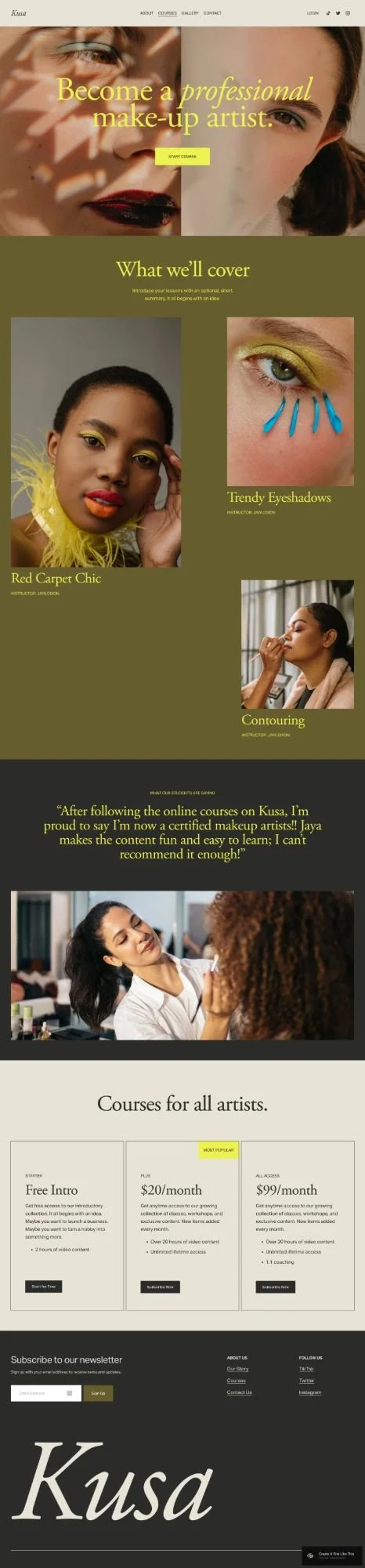
Kusa is a one-page Squarespace template built for online course creators, specifically beauty & makeup educators.
The template uses a one-page layout with a beauty-focused aesthetic: soft colors, elegant typography, and sections for your courses, testimonials, FAQ accordion, and portfolio gallery. If you teach makeup, skincare, or beauty skills and need a site that looks as polished as your work, Kusa delivers that vibe.
But here's the question: Does the beauty-focused design work for what you teach, or will you be fighting against the aesthetic?
Let's figure it out.

What's Included in the Kusa Template
Kusa is a one-page Squarespace website layout. You get:
Hero section with headline and tagline
Course sections showing individual programs with instructor names
Testimonial section (student quotes)
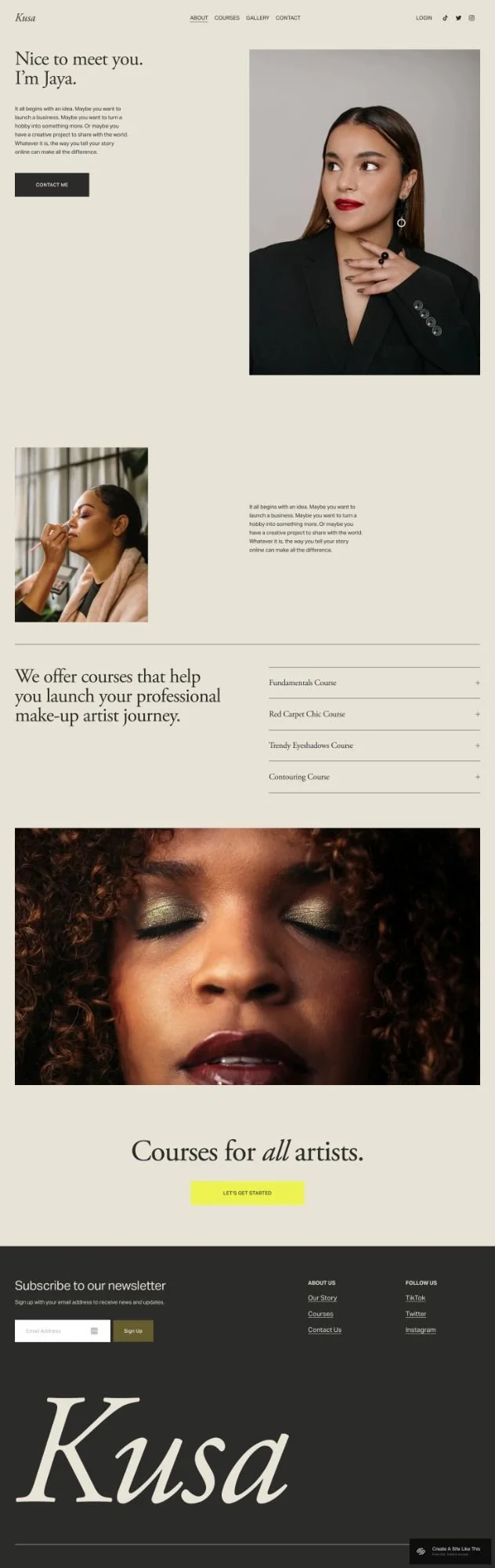
About section (bio and photo)
FAQ section (accordion style)
Portfolio gallery (for student work or examples)
Newsletter signup
Social media links
Standard Squarespace 7.1 features apply. Mobile-responsive.
The aesthetic is clearly beauty-focused. Soft pinks, elegant fonts, beauty product imagery. If you teach makeup or skincare, you're set. If you teach something else, you'll need to restyle everything.

Who The Kusa Squarespace Template Is For
Kusa works best if you're:
A makeup artist teaching online courses (the demo is literally designed for this)
A beauty educator offering skincare, lash extension, or brow training
An esthetician teaching professional certification courses
A hair stylist offering coloring or styling workshops
Kusa MIGHT work if you're willing to completely restyle it:
A wellness coach teaching yoga, meditation, or breathwork (but you'll need to change all the colors, fonts, and imagery)
A creative skills instructor (photography, art, design)
A professional development trainer (but the beauty aesthetic won't match your brand)
Kusa is NOT for you if:
You don't teach beauty skills AND don't want to spend time restyling the entire template
You run a membership site with ongoing content (this showcases courses, not member areas)
You offer services beyond courses (the course-specific layout will feel limiting)
You're selling physical products (it's built for courses)
Pros & Cons of Kusa
What Works Well
Perfect for beauty educators. If you teach makeup, the demo aesthetic matches your brand right out of the box. The course titles, imagery, and overall vibe are all beauty-focused.
Course sections are ready to use. Three course sections with titles, descriptions, and instructor names. Swap in your information and you're basically done.
Testimonials are prominently placed. Student reviews help sell courses. Kusa puts them where visitors will see them.
FAQ accordion saves space. Questions about prerequisites, course format, or certifications stay tucked away until someone clicks.
Portfolio gallery for before/afters. Perfect for showing transformation results: makeup before/afters, client work, or student progress.
Where Kusa Falls Short
The beauty aesthetic is STRONG. If you don't teach beauty skills, you'll need to change colors, fonts, imagery, and possibly the entire feel of the template. That's doable, but it's work.
One-page layout might not be enough. If you need detailed course pages, separate sales pages for each program, or lots of methodology content, a single scrolling page will feel limiting.
No blog included. If content marketing matters to you, you'll add a blog separately and make it work with the one-page design.
Like most Squarespace templates, SEO needs manual work. Heading tags aren't set up correctly by default (no H1 tags). You'll fix that yourself.
Bottom Line
Kusa is perfect if you're a makeup artist, beauty educator, or esthetician teaching 3-6 courses. The demo aesthetic is so dialed in for beauty education that you'll barely need to customize it.
If you teach something else — wellness, creative skills, professional development — you CAN use Kusa, but you'll spend significant time restyling it to match your brand. At that point, you might save time starting with a more neutral template.
And if you need individual sales pages for each course, a blog, or membership features, Kusa's one-page layout will probably feel too limited.
My take: If you teach beauty skills and want a one-page site, Kusa is gold. If you teach anything else or need more structure, look for a template that better matches your industry and complexity needs.
Getting Started with the Kusa Squarespace template is easy:
Once you pick Kusa in the Squarespace 7.1 template library, here's what to do:
Replace demo content. Swap in your photo, headline, and course descriptions.
Update course sections. Add real course titles, what students learn, and instructor info. Make sure CTAs link correctly.
Add testimonials. Use real student quotes. If you don't have any yet, delete this section until you do.
Customize FAQs. Add questions students actually ask: course length, prerequisites, refund policies. Delete the demo questions.
Update your bio. Build trust by explaining your experience and credentials. Keep it friendly but professional.
Fix heading hierarchy. Make your main headline an H1. Subheadings should follow in order (H2, H3, H4). This matters for both SEO and accessibility.
Adjust colors and fonts. Click the paintbrush icon in the upper right to open Site Styles. Change your brand colors and fonts to match your actual brand
Add more pages if needed. The demo is one page, but you can add a blog, individual course pages, or contact page.
Connect your email provider. Set up the newsletter block with Squarespace Campaigns, Mailchimp, Flodesk, or Kit.
Check everything and publish. Test on mobile, check all links, verify course info.
Kusa Squarespace Template FAQs
Can I sell products on the Kusa website template?
Yep. Squarespace lets you add a shop page to any site. But Kusa's layout is more focused on courses and teaching than selling products. If your site will mostly be a store, try a template designed for e-commerce. If you just want to sell a few things alongside your courses, you can easily add a shop.
Is the Kusa template good for SEO?
Yes. It's mobile-friendly and loads quickly, which helps. But like all Squarespace templates, Kusa doesn't set up heading hierarchy correctly by default. You'll need to manually fix your Header tags. Squarespace itself has solid SEO features (custom page titles, meta descriptions, clean URLs), but the template won't do the heading structure for you.
Can I use the Kusa template on mobile?
Absolutely. Like all built-in Squarespace templates, Kusa is fully responsive and adjusts to look good on phones and tablets.
Can I change fonts and colors on the Kusa template?
Yes. Kusa is built on Squarespace 7.1, so you can customize fonts, colors, buttons, and more through Site Styles. You can even now upload your own fonts as of fall 2025. No code needed.
Can I add a blog to the Kusa template?
Yes. The demo doesn't include a blog, but you can add one through the Pages panel. Just know that the template is optimized for course promotion, so you might need to adjust your blog layout to match the overall look.
Is Kusa good for membership sites?
Not really. Kusa is built to showcase individual courses, not manage ongoing membership content. If you're running a membership with regular content releases and members-only areas, you'd be better off with a different template or using Squarespace's member areas with a more flexible layout.
Can I add booking or scheduling to Kusa?
Kusa doesn't include built-in scheduling sections, but you can add Squarespace's Scheduling feature through Acuity Scheduling (which Squarespace owns). You'd integrate it separately. If booking is central to your business, you might want a template that already has scheduling sections set up.
Can I use Kusa for something other than courses?
You can, but it'll take more work. The template is clearly designed for online education, so if you want to use it for something else, you'll need to rework the course sections and overall messaging. It's possible, but you'd probably save time starting with a more flexible template.
How many courses can I show on Kusa?
The demo shows three courses, but you can add more by duplicating sections. That said, if you're offering 10+ courses, you might want a dedicated course catalog page instead of listing everything on one scrolling page. Kusa works best when you're highlighting 3-6 main programs.
Does Kusa work with Squarespace's course feature?
It can. Squarespace has a built-in course feature (part of their higher-tier plans) that lets you host video courses on your site. You can use Kusa to promote those courses and link to the course pages. But Kusa itself is just the front-end template; it doesn't automatically connect to Squarespace Courses. You'd set that up separately.