Auburn Squarespace Template Review
This post contains affiliate links. If you purchase through them, I may receive a small commission at no extra cost to you.
Table of Contents Show
Auburn is a Squarespace template designed for restaurants, cafes, and food businesses that need to look great and make it easy for your customers to find what they need.
Big hero images, clean menu layouts, location management, and room for food photography front and center. If you run a restaurant and you're tired of your ancient DIY website and want something easy to manage and update, Auburn probably caught your eye for good reason.
This review covers what Auburn includes, pros and cons, where it shines, and where you may hit limitations.
The goal: help you figure out if this built-in Squarespace template is the right fit for your restaurant, or if you should keep looking.
Who the Auburn Template Works Best For
Auburn is designed for food businesses that want to look polished, while making it easy for customers to find what they need. The template works when you have multiple locations to showcase, a menu that needs clear organization, and enough quality food photography to fill those large image spaces.
Full-service restaurants especially with more than one location and reservations to manage
Upscale cafes and bistros that want sophistication without confusion
Food trucks with rotating stops where customers need to know where you are right now
Culinary businesses expanding online like catering companies, specialty bakeries, or gourmet shops that need more than just a menu & address
What You Get with the Auburn Template
Home Page
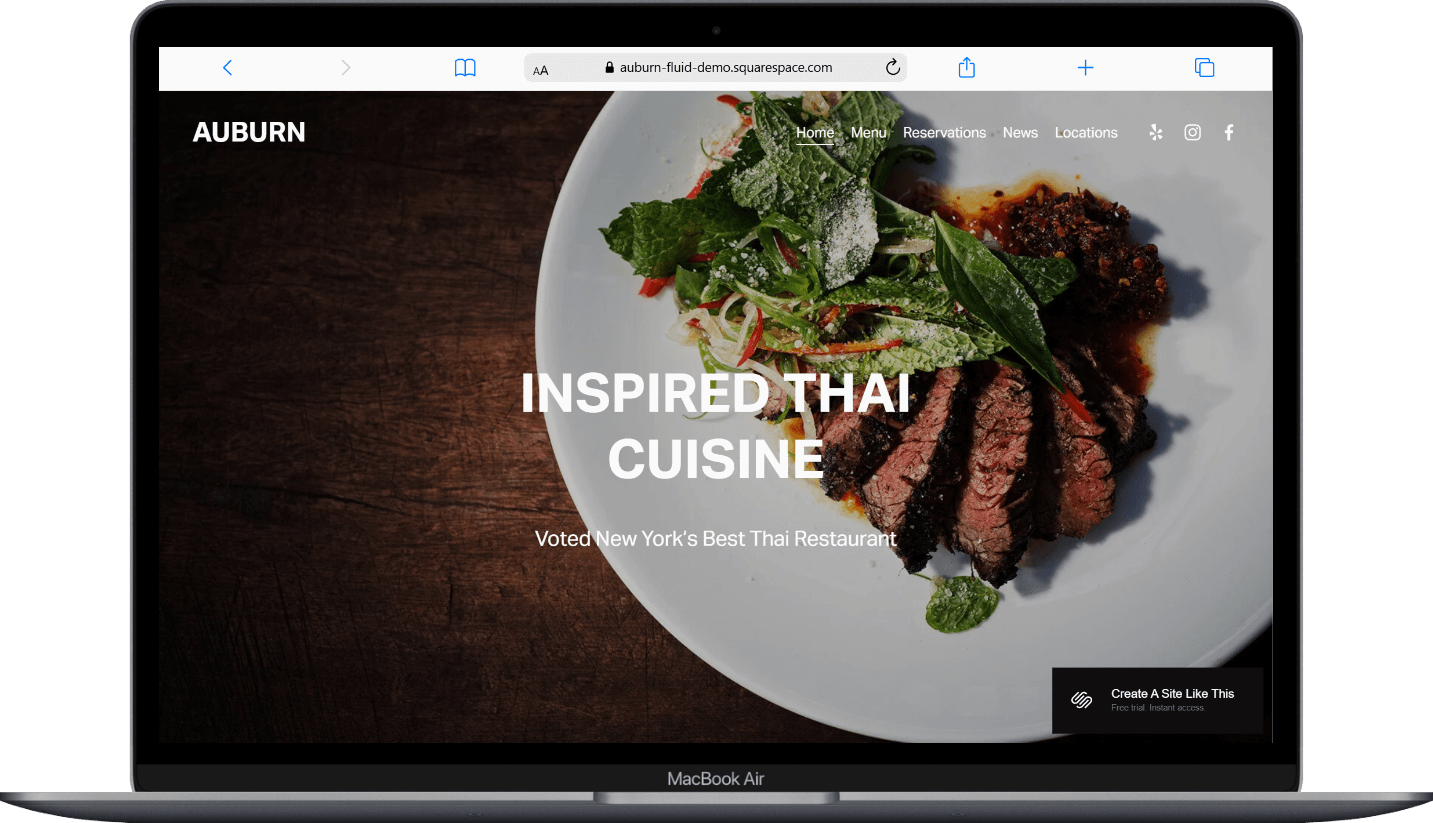
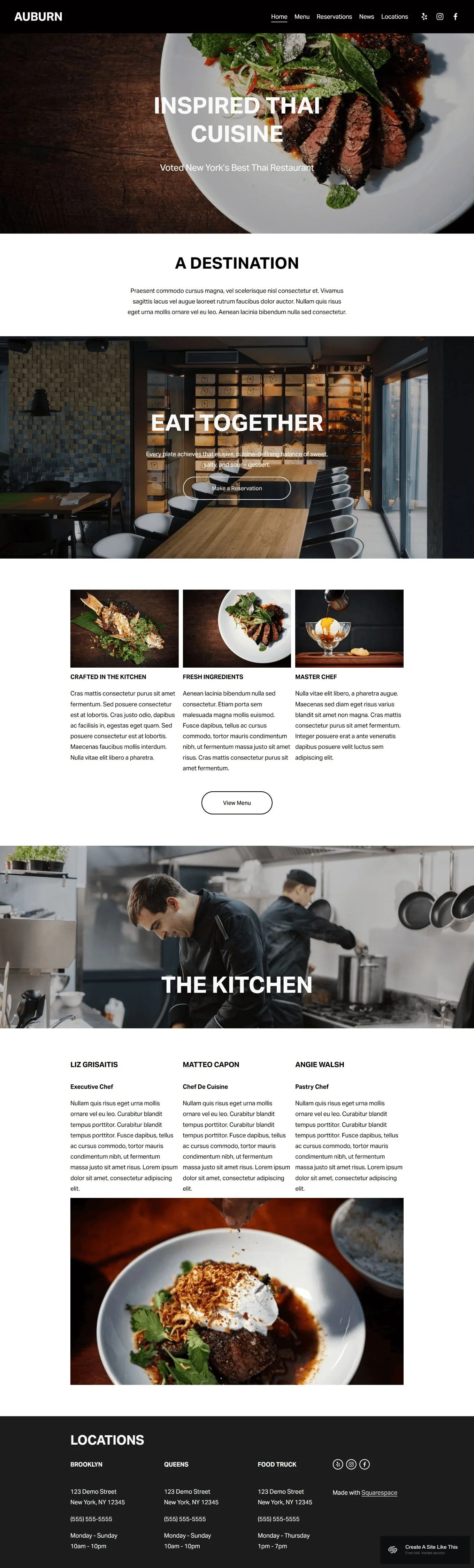
Full-width hero image front and center, with text overlay and navigation. The demo includes sections for your restaurant's story, feature highlights with images and descriptions (think: crafted in the kitchen, fresh ingredients, master chef vibes), and a team section with photos and bios.
Menu Page
Organized layout for menu items with descriptions and prices. The demo shows a simple mission statement with location details, but the page is built to handle your full food and drink listings.
Locations Page
Multiple location cards, each with address, contact info, email, and hours. Perfect for multi-location restaurants or food trucks that need to keep customers in the loop.
Reservations Page
Space for reservation details, party size selection, and booking integration (works with OpenTable and similar platforms). The demo includes room for private dining information too.
News Page (Blog) Built-in blog for sharing updates, seasonal menu changes, featured dishes, events, or behind-the-scenes content. Each post includes a large featured image.
Extras
Full-width background images throughout
Team member profiles with photos and bios
Social media integration (yes, including Yelp)
Mobile-responsive design
Integration with reservation platforms
Contact forms on location pages
Instagram feed capability
Key Strengths of the Auburn Template
Built for Visual Storytelling
Auburn gives you serious real estate for photography. Those full-width images are doing the heavy lifting. If you've invested in quality food photography (or have a dining space worth showing off), this template lets those visuals do what they're supposed to do: make people hungry and get them through your doors.
Multi-Location Management
The Locations page isn't just an address dump. Each location gets its own card with everything customers need: address, phone, email, specific hours. This is ideal for restaurants with multiple spots. And for food trucks with different daily locations, this structure eliminates the endless "where are you today?" messages cluttering your DMs.
Reservation Integration
Auburn includes a dedicated reservations page that connects with platforms like OpenTable or Tock. If reservations drive your revenue, this pre-built feature helps people book easily.
Space for Your Team's Story
The kitchen team section lets you highlight the people behind the food. This works especially well for chef-driven restaurants or businesses where personality matters (almost) as much as the menu.
Best Use Cases for the Auburn Template
Multi-Location Restaurant Groups If you're running two or more locations with different hours, menus, or contact information, Auburn's location setup keeps everything organized.
Restaurants Where Photography Is the Marketing When your Instagram feed drives foot traffic and your dishes photograph beautifully, Auburn gives you the space to showcase that. This template is built for businesses where visuals sell; think elevated comfort food, artful plating, or a dining room people want to photograph.
Food-Focused Businesses Adding Catering or Events If you're expanding beyond regular service into catering, private dining, or special events, Auburn's structure lets you add those offerings without everything feeling cluttered. The News section works great for promoting seasonal menus or upcoming events.
Chef-Driven Concepts Where Personality Matters Farm-to-table restaurants, culinary collectives, or chef-owned concepts benefit from Auburn's team profile section. When your sourcing story or chef's background is part of the draw, this template gives you room to tell it.
Food Trucks Building anOnline Presence For food trucks moving beyond Instagram-only updates, Auburn provides structure. The locations page works for daily schedules, the menu page keeps offerings current, and the news section lets you announce new locations or menu drops without relying on social media algorithms.
What the Auburn Template Is Not Best For
The Auburn template may NOT be the best fit if you:
Need robust e-commerce for selling products online (packaged goods, merchandise, meal kits)
Run a single-location cafe with a simple offering and don't need location management
Want a one-page layout where everything lives on the homepage
Don't have quality food photography and can't invest yet in getting it
Pros & Cons of the Auburn Template
Pros
Visual-first design that showcases your photography: full-width images and clean spacing let high-quality photos be the star
Easy location management: multiple location cards with complete details eliminate confusion for multi-location businesses
Dedicated reservations page: connects seamlessly with OpenTable or Tock for actual reservation functionality
News/blog section built in: easy way to share menu updates, seasonal offerings, or events without rebuilding your whole site
Team profiles add personality: space to introduce your kitchen staff or highlight the people behind the business
Cons
You need quality photography to pull this off: those large image spaces will look unprofessional with mediocre iPhone photos
Can feel like overkill for very small operations: if you've got one location and a simple menu, you might not need all this structure
No automatic SEO structure: like most of Squarespace’s free templates, heading hierarchy isn't set up for optimal SEO out of the box
Getting Started with the Auburn Template is Easy:
Once you pick Auburn in the Squarespace 7.1 template library and you're ready to build, here's what to do first:
Replace the hero image with your best food photo. This is the first thing visitors see; use a high-resolution image that represents your brand and makes people hungry. The image should be at least 2000px wide.
Update all location information immediately. Go through each location card and replace demo addresses, phone numbers, emails, and hours with your actual details. Double-check for accuracy. Wrong hours cost you customers.
Set up your reservation integration. Connect your OpenTable, Tock, or preferred booking platform. Test the booking flow yourself to make sure it works smoothly before going live.
Customize your menu page structure. Decide how you want to organize your menu: by course, by category, or as separate food and drink menus. Replace the demo content with your actual offerings, including descriptions and prices.
Add your team profiles. Upload photos of your kitchen staff or key team members and write short, genuine bios. Keep these conversational and focused on what makes each person's contribution unique.
Check your heading hierarchy. Squarespace templates don't always include proper heading structure by default, so make sure your main headline is an H1 and subheadings follow logical order (H2, H3, etc.). This matters for both SEO and accessibility (screen readers).
Adjust colors and fonts in Site Styles. Go to Design > Site Styles and update the color palette and typography to match your brand.
Populate or remove the News section. If you plan to regularly post updates, write your first 2-3 posts before launching. If you won't maintain a blog, just remove this page rather than leaving it empty.
Add your social media links and integrate Instagram. Connect your social accounts in the footer and consider adding an Instagram feed to keep the site feeling current.
Test everything, connect your domain, choose your plan, and launch. Check the site on mobile, verify all links work, and make sure reservation booking is functioning before you officially go live and announce your new site.
Auburn Squarespace Template FAQs
Can I sell products on the Auburn website template?
Yes, but with some caveats. You can add Squarespace's e-commerce functionality to Auburn for selling items through a shop page. But Auburn is designed to showcase restaurant menus and locations, not product catalogs. If you want to sell a few items (signature sauces, cookbooks, gift cards), it works fine. If selling packaged goods is your main business model, start with a template built for e-commerce instead.
Is the Auburn template good for SEO?
Auburn has the same SEO capabilities as all Squarespace 7.1 templates — which means the tools are there, but the structure isn't automatically optimized. You'll need to manually set up proper heading hierarchy (H1, H2, H3, H4) on each page, write custom page titles and meta descriptions, and add alt text to images. Squarespace includes built-in SEO features like automatic sitemaps and mobile responsiveness, but the template itself doesn't give you an SEO advantage out of the box.
Can I use the Auburn template on mobile?
Yes. Auburn is fully mobile-responsive, meaning the layout automatically adjusts for phones and tablets. The large images scale down appropriately, navigation condenses into a mobile menu, and all functionality (including reservations) works on smaller screens. Given that most restaurant searches happen on mobile, this responsiveness is essential, and Auburn handles it well.
Can I change fonts and colors on the Auburn template?
Absolutely. Go to Design > Site Styles to access all customization options. You can change colors (background, text, accent colors), fonts (from 600+ Google Fonts and 1,000+ Adobe Fonts), button styles, and spacing. You have full control to adjust the mood to match your brand.
Does Auburn work for single-location restaurants?
Yes, but you might not need all its features. If you only have one location, the multi-location page structure is overkill. You could simplify by putting your address and hours in the footer or on a simpler contact page. Auburn works fine for single-location restaurants, but templates with less location-focused structure might feel more appropriate if you're keeping things simple.
Can I integrate online ordering with Auburn?
You can integrate online ordering through third-party platforms. Add links to your DoorDash, Uber Eats, or GrubHub pages in the navigation or as buttons on your menu page. Squarespace also supports embedded ordering widgets if your delivery platform provides them. Auburn doesn't have built-in ordering functionality, but it accommodates external integrations easily.
Can I add more pages to Auburn?
Yes. Squarespace 7.1 templates are flexible: you can add unlimited pages beyond what's in the demo. Common additions for restaurants include separate pages for private events, catering services, press mentions, or an expanded "About" page. Just maintain the visual consistency Auburn establishes so new pages don't feel disconnected.
Does Auburn require any coding knowledge?
Nope. Auburn uses Squarespace's standard drag-and-drop editor (including the Fluid Engine on 7.1), so you can customize everything without writing code. If you want to add custom functionality beyond what Squarespace offers, you can add CSS or JavaScript, but it's definitely not required for a professional-looking site.
View Auburn Demo
Ready to see if Auburn is the right fit? Demo it here.