Çimen Squarespace Template Review
This post contains affiliate links. If you purchase through them, I may receive a small commission at no extra cost to you.
Table of Contents Show
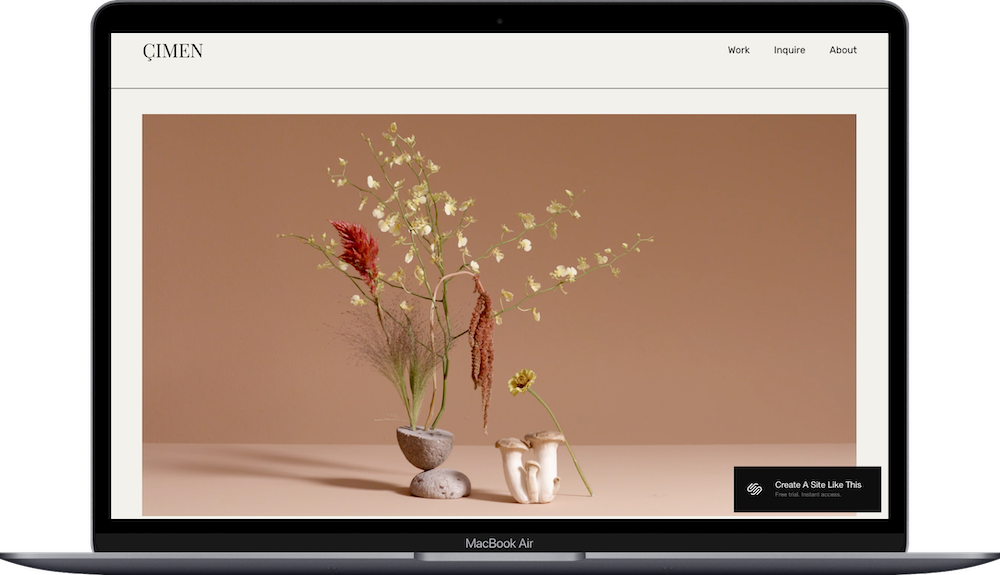
Çimen is a Squarespace template designed for videographers, photographers, and visual creatives.
Part of Squarespace's Magnum Collection (created with photographer Sabiha Çimen), this template opens with a full-width video background and uses multi-column grid layouts to organize your portfolio.
If you shoot commercial video, branded content, or photography that includes motion work, Çimen puts that front and center.
But here's the question: Do you actually need a video-first homepage, or would a simpler portfolio template work better?
Let's figure it out.
Who The Çimen Template Is For
Çimen works best if you're:
A videographer or cinematographer shooting commercial video, branded content, or reels
A commercial photographer doing product, advertising, or editorial work (especially if you're adding video)
A multimedia designer or creative studio blending photography, video, and motion graphics
An interior designer creating video walkthroughs or immersive project documentation
Çimen is NOT for you if:
You don't shoot video and don't want a video homepage (you can replace it with an image, but why choose this template?)
You're selling physical products with extensive inventory (it's built for portfolios, not e-commerce)
You need a blog-heavy site with regular publishing
You want detailed service pages, team bios, and testimonial sections (not built in)
You need booking or scheduling features (not included)
Can you add e-commerce or a blog? Sure, Squarespace lets you add whatever you want. But Çimen is built for visual storytelling, not product sales or content publishing. You'd be working against the template's strengths.
What You Get With the Çimen Template
Home Page
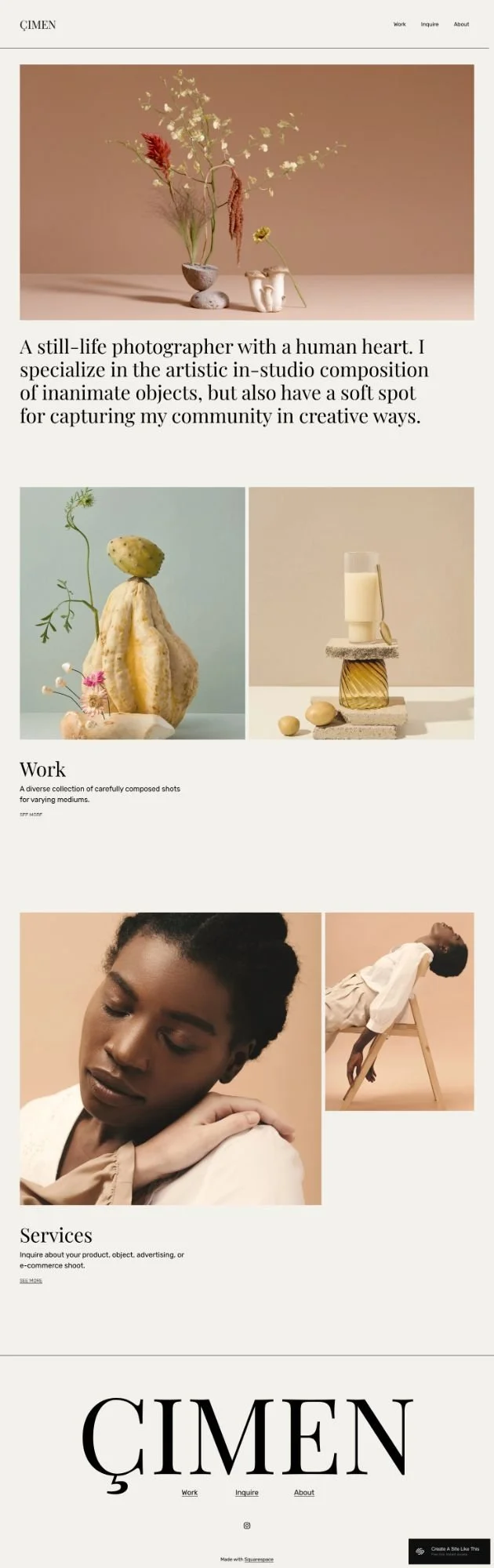
Full-width video background (your reel, motion work, or brand video), followed by a multi-column grid showing project thumbnails. Clean and minimal, no slideshow arrows.
Work Page
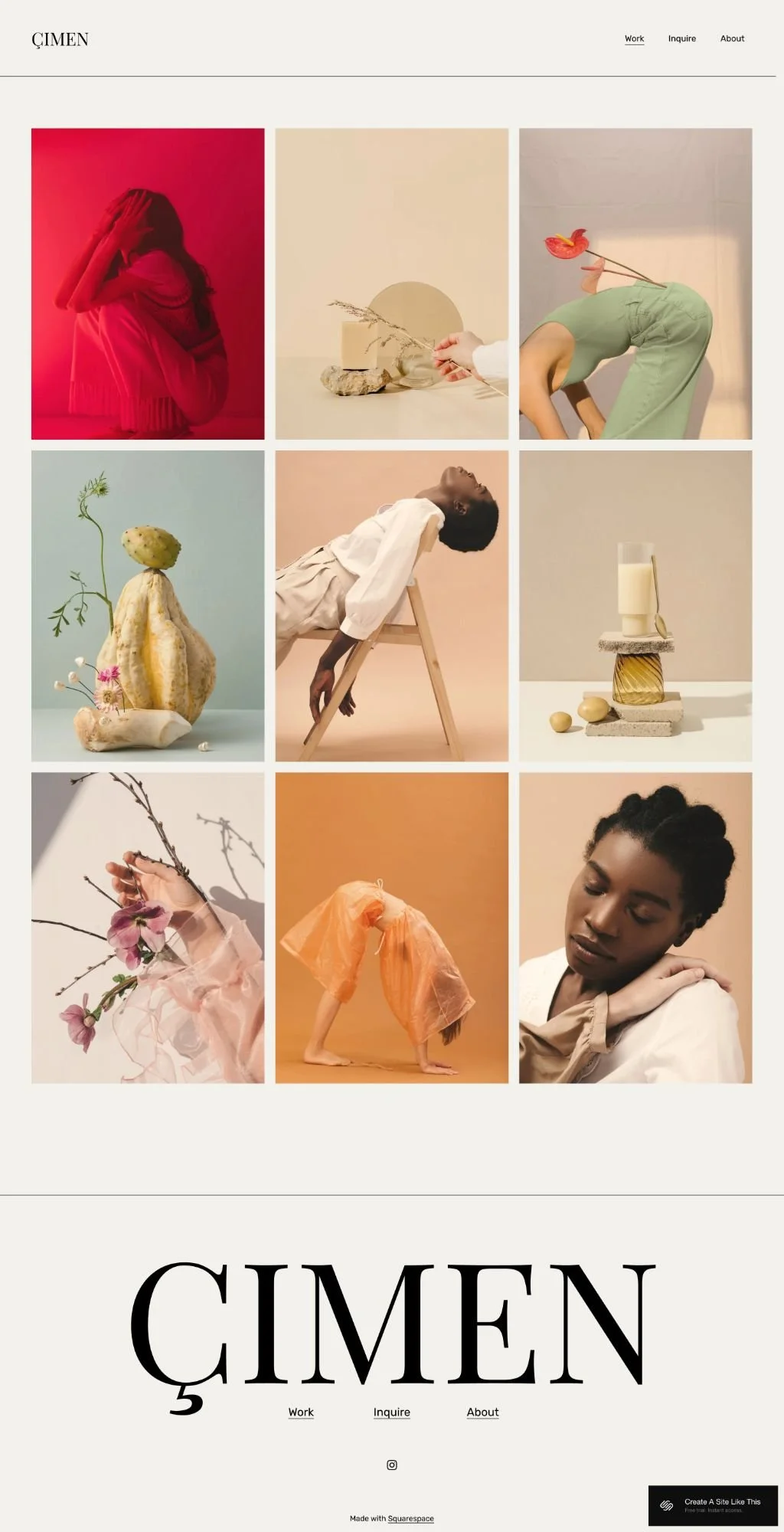
Three-column grid displaying your portfolio. Each project opens in a lightbox so visitors stay on the same page while browsing. Individual project pages include space for multiple images, project details, and descriptions.
Inquire Page
Contact form with accordion sections where you can describe your services in detail. Helps pre-qualify leads before they reach out.
About Page
Space for your bio, background, and story.
Pros & Cons of the Çimen Squarespace Template
What WOrks Well
Homepage video capability makes it easy to lead with motion work
Lightbox gallery functionality keeps visitors on the page while browsing projects
Inquiry page with accordion sections helps pre-qualify leads by explaining services upfront
Clean, minimal navigation keeps the focus on your work
Cohesive visual design with matching backgrounds creates a polished, intentional look
What could be better
Limited built-in pages means you'll need to create additional sections from scratch
No built-in SEO hierarchical structure (like most Squarespace templates)
Minimal navigation may feel restrictive if you need multiple service types or blog categories
Bottom Line
Çimen is perfect if you're a videographer or visual creative whose work includes motion content and you want a video-first homepage that immediately shows what you do.
The lightbox gallery, minimal navigation, and inquiry page with service descriptions all support the goal: showcase your work professionally and convert visitors into clients.
But if you don't shoot video, the homepage feature you're paying for (metaphorically; it's free) won't get used. And if you need detailed service pages, a blog, or extensive content beyond your portfolio, Çimen's minimal structure will feel limiting.
My take: If you shoot video and want it front and center, Çimen is solid. If you're a photographer who doesn't do motion work or you need more than a portfolio showcase, look for a template with more built-in structure.
Getting Started with Çimen Template is Easy:
Once you pick Çimen in the Squarespace 7.1 template library, here's what to do:
Replace the homepage video. Upload your own video file or link to a video hosted on Vimeo or YouTube. Keep file sizes reasonable for faster loading times.
Update the portfolio grid. Replace demo project thumbnails with your own work. Make sure images are high-resolution and sized consistently for a clean grid appearance.
Set up project pages. Add images, descriptions, and details for each portfolio piece. Include client info, project scope, or context that explains the work.
Customize the inquiry form. Edit accordion sections to describe your services, pricing, or process. Adjust form fields to collect what you need from potential clients.
Write your about page content. Replace demo text with your bio, experience, and story. Add images that give visitors insight into who you are and how you work.
Set brand colors and fonts. Go to Design > Site Styles and update your palette and fonts. Çimen's minimal design works best with subtle colors and clean typography.
Check your heading hierarchy. Make sure your main headline is an H1 and subheadings follow logical order (H2, H3, H4) for better SEO. Squarespace templates don't always include proper heading structure by default.
Set up navigation. Decide if you want to keep the minimal three-link menu or add additional pages. Keep navigation clean to maintain the template's streamlined aesthetic.
Test the lightbox. Click through portfolio projects to make sure images display and load correctly.
Double check everything and go live. Review all pages on desktop and mobile, test all links, and make sure images load properly before launching. Connect your domain and choose your Squarespace plan. Then… you're ready to launch!
Çimen Squarespace Template FAQs
Can I sell products on the Çimen website template?
Technically… yeah. You CAN add a shop since all Squarespace 7.1 templates support e-commerce. But… Çimen is designed as a portfolio template for visual creatives, not an e-commerce site. The homepage video and grid layout prioritize showcasing work over product browsing. You could sell prints or limited offerings, but if e-commerce is your primary business model, choose a template built for product sales. You'll save yourself a lot of frustration.
Is the Çimen template good for SEO?
Yep. Çimen has the same SEO capabilities as all Squarespace templates. You can customize page titles, meta descriptions, URLs, and image alt text. Like all Squarespace templates, Çimen doesn't include built-in hierarchical heading structure, so you'll need to manually organize your headings (H1, H2, H3) for better SEO. The minimal content structure might also limit opportunities for text-based SEO if your work relies heavily on written content — consider adding a blog if organic search traffic is important to your business strategy.
Can I use the Çimen template on mobile?
Absolutely. Çimen is fully mobile-responsive and works on all devices. The grid layouts adjust for smaller screens, the video background adapts to mobile viewing, and the minimal navigation translates well to mobile menus. The lightbox functionality works smoothly on touch devices too.
Can I change fonts and colors on the Çimen template?
Yes, you can easily customize fonts and colors through Site Styles in the Design panel. Çimen's minimal design gives you flexibility to adjust the color palette and typography to match your brand.
Can I add more pages to the Çimen template?
Yes, you can add as many pages as you need. Çimen comes with four main pages (Home, Work, Inquire, About), but you can create additional pages like Services, Team, Blog, or Contact. Just keep in mind the minimal navigation structure works best with a limited number of menu links; adding a dozen pages might undermine the clean aesthetic.
Does Çimen work for photographers who don't shoot video?
It can. While Çimen is designed with video in mind, you can easily replace the homepage video with a static image or image slideshow. The grid portfolio layout and lightbox functionality work perfectly for photography-only portfolios. That said, if video isn't part of your work at all, you might find other templates more aligned with your specific needs.
Can I integrate booking or scheduling with Çimen?
Yes, you can integrate Squarespace's Acuity Scheduling or other third-party booking tools. However, there's no built-in booking page or calendar functionality, so you'll need to create a new page or add a scheduling block to an existing page. The inquiry page form is a good alternative for collecting initial contact information if you don't need automated scheduling.
Is Çimen part of the free Squarespace templates?
Yes. Çimen is included in Squarespace's free template library. (Scroll through all of Squarespace’s 100+ free templates here.) As part of the Magnum Collection, it's available to all Squarespace users at no additional cost. You can demo Çimen here and if you like it, you can use it with any Squarespace plan.
Does Çimen work for service-based businesses?
It depends. If your service is visual (like photography sessions, video production, or design work) and can be shown through a portfolio, Çimen works well. If you offer coaching, consulting, or services that need detailed explanation with multiple service tiers, Çimen's minimal structure might not provide a great space for that content without feeling forced.
Can I add a blog to Çimen?
You can add a blog page, but Çimen's minimalist design isn't optimized for blog-heavy content. If blogging is a major part of your business strategy or content marketing plan, other templates put the blog more prominently in the design and make it easier to showcase your writing.