Hill Squarespace Template Review
This post contains affiliate links. If you purchase through them, I may receive a small commission at no extra cost to you.
Table of Contents Show
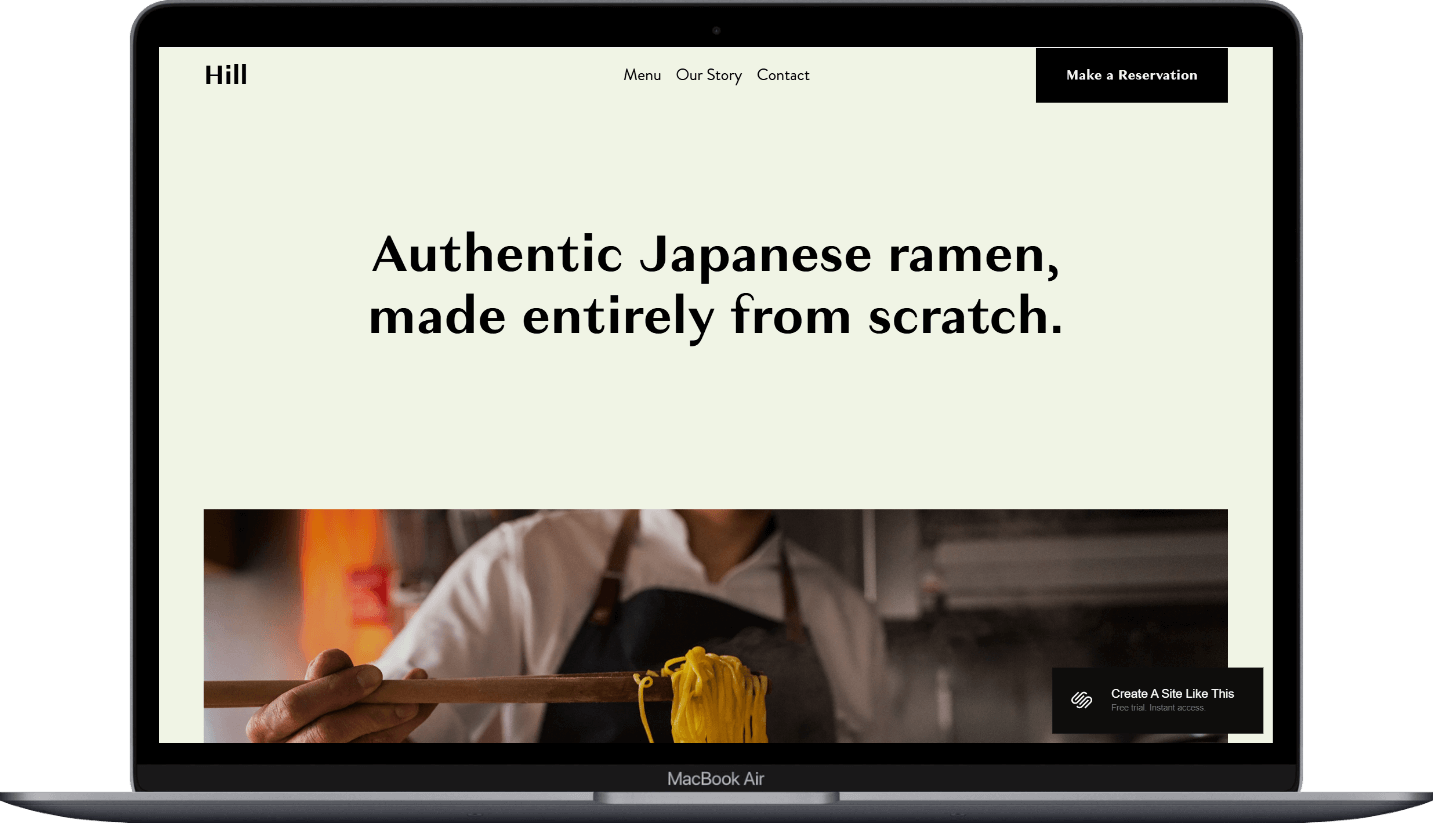
Hill is a Squarespace template designed for restaurants, cafes, and food businesses that want to tell their story along with showcasing their menu.
The Hill restaurant template uses bold typography, large imagery, and a clean minimalist design to create an immersive experience that puts your food and your narrative front and center.
If you're a restaurant owner, chef, or food business with a story worth telling and handcrafted offerings, Hill probably caught your eye for good reason.
This review covers what Hill includes, pros and cons, where it shines, and where you might bump into limitations.
The goal: help you figure out if this free Squarespace restaurant template is the right fit for your business or if you should keep looking.
Who the Hill Template Works Best For
Hill works best for food businesses that prioritize storytelling and authenticity. It’s layout supports a slower, more immersive browsing experience that invites visitors to learn about your journey, your process, and your passion for what you create.
Artisan restaurants and ramen shops with specialty dishes or traditional preparation methods that want to highlight craftsmanship and dedication to the craft.
Chef-driven concepts where the chef's story, ingredient sourcing, or culinary philosophy is central to the brand identity and customer experience.
Farm-to-table restaurants that need space to share their sourcing practices, ingredient stories, and connection to local producers or seasonal menus.
Specialty cafes and boutique food businesses with a focused menu and a strong brand narrative around how they prepare their offerings.
What You Get with the Hill Template
Homepage
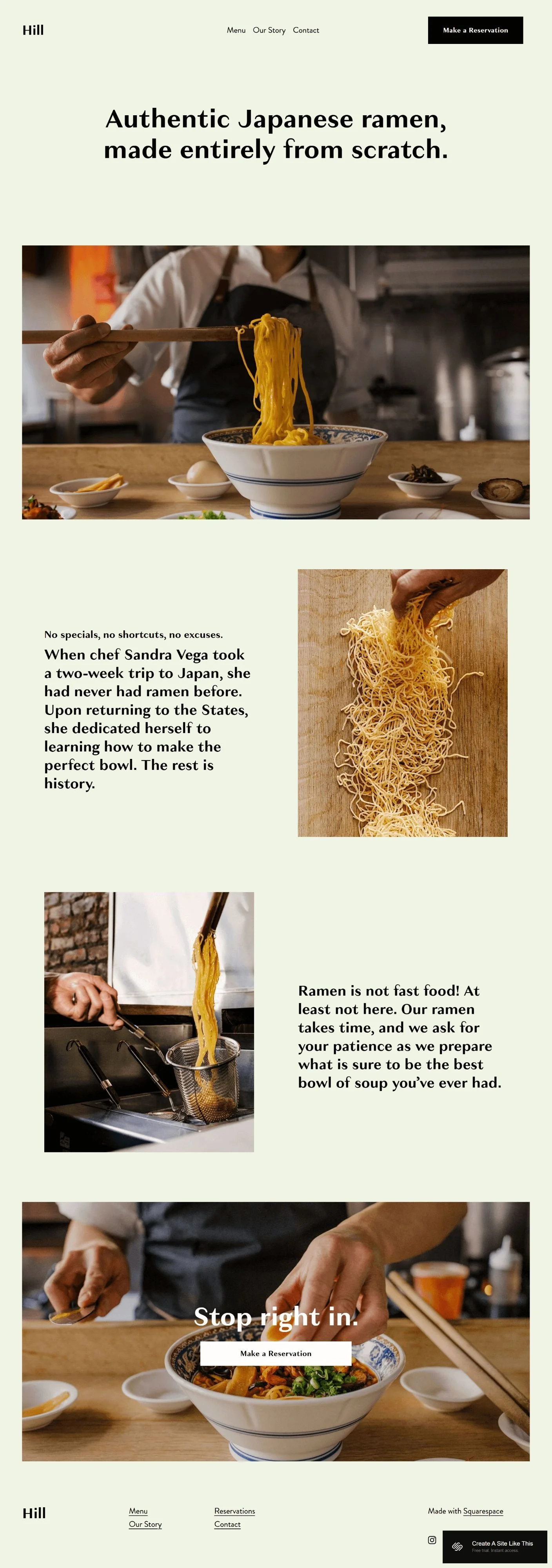
Sections include large food photography, narrative text blocks describing the philosophy and approach, and a clear call-to-action for making reservations.
Menu Page
A dedicated menu page designed to showcase your offerings in a clean, organized format with categories and detailed descriptions.
Our Story Page
Space to tell your brand's origin story, chef's journey, or restaurant philosophy. The layout supports longer narrative content with supporting imagery.
Contact Page
Contact information, location details, hours of operation, and a contact form for inquiries.
Extras
Built-in reservation button in the header for easy access
Responsive design that adapts to all screen sizes
Integration capabilities with third-party reservation systems like Tock and OpenTable
Customizable color schemes and typography through Site Styles
Large format photography throughout for visual storytelling
Clean navigation with minimal distractions
Key Strengths of the Hill Template
Built for Storytelling Hill gives you ample space to share your story without feeling cluttered. The layout lets you explain your process, your ingredients, or your journey in a way that feels natural and engaging. If your restaurant's identity is tied to how you make things or where you come from, this template makes it easy to communicate that.
Minimalist Design That Highlights Your Food Hill's clean aesthetic puts the focus squarely on your photography and messaging. There's plenty of white space, no visual clutter, and a straightforward layout that lets your food images do the talking. If you invest in quality food photography, this template showcases it beautifully.
Reservation-Forward Layout The prominent "Make a Reservation" button in the header means visitors can book a table without hunting around. This is great for restaurants where table reservations are a primary conversion goal.
Best Use Cases
1. Traditional or Artisan Restaurants If you run a ramen shop, sushi bar, pasta house, or any restaurant built around traditional preparation methods, Hill's reverent approach to food presentation works perfectly. The template lets you explain why your ramen takes time to prepare or why you make everything from scratch, turning potential wait times into selling points.
2. New Restaurant Launches When you're opening a new restaurant and need to introduce both yourself and your concept to the community, Hill provides the structure to tell your complete story. You can explain your background, your vision, and what makes your restaurant different, all while building anticipation.
3. Chef-Forward Dining Experiences For restaurants where the chef's background, training, or unique perspective is central to the brand, Hill gives you the platform to share that narrative. The story page works well for explaining your culinary philosophy or your path to opening the restaurant.
4. Specialty Food Businesses If you're running a boutique bakery that specializes in sourdough, a coffee roastery with a unique sourcing story, or any food business built around a specific craft or specialty, Hill's focus on process & authenticity will align well with that approach.
5. Small Format Restaurants with Focused Menus Hill works well when you have a tight, curated menu rather than extensive options across multiple categories. The template supports showcasing quality over quantity, which suits restaurants with a dozen or so carefully crafted dishes, rather than sprawling multi-page Cheesecake Factory-style menus.
What the Hill Template Is NOT Best For
The Hill template probably isn't the best fit if you:
Run a large restaurant with an extensive menu across multiple meal periods, dietary options, and seasonal variations that need complex organization (think Cheesecake Factory style)
Need e-commerce functionality to sell packaged goods, merchandise, or meal kits as a primary business model
Want a one-page scrolling layout where everything is accessible without clicking to different pages (check out Heron for that)
Operate a fast-casual restaurant where speed & convenience are the main selling points and you don't need much storytelling
Pros & Cons of the Hill Template
Pros
The bold typography (the demo site uses Granville for the header font and Brandon Grotesque for the body font) and high-contrast design create strong visual hierarchy that guides visitors naturally through your content
Large format photography spaces throughout the template let you showcase your dishes, ingredients, and restaurant atmosphere effectively
The storytelling-focused layout gives you room to build connection with potential customers before they visit, which works well for building anticipation
Prominent reservation call-to-action in the header makes it easy for visitors to book a table without hunting through the site
Cons
Limited built-in pages means you'll need to create additional pages from scratch if you need separate pages for events, catering, private dining, or gift cards
The template is designed for smaller, focused menus, so restaurants with extensive offerings across many categories may find the menu structure too simple
Like most Squarespace templates, Hill doesn't include proper heading hierarchy by default, which means you'll need to manually fix the SEO structure
Getting Started with the Hill Template is Easy:
Once you pick Hill in the Squarespace 7.1 template library and you're ready to build, here's what to do first:
Replace the hero image on your homepage. Upload a high-quality photo of your signature dish, restaurant interior, or food preparation that represents your brand. This is the first thing visitors see, so make it count.
Swap out all demo content with your actual story. Replace the ramen shop narrative with your restaurant's origin story, chef's journey, or philosophy. Be authentic and specific; generic copy about "passion for food" won't differentiate you.
Customize your colors and fonts in Site Styles. Adjust the color palette to match your brand. Change typography if needed, but be careful not to pick fonts that clash with the clean, modern aesthetic of the template.
Update your menu page with your actual offerings. Add your dishes with descriptions, prices if you include them, and any dietary information. Keep descriptions clear and appetizing without being overly flowery.
Set up your reservation system integration. Connect Tock, OpenTable, Resy, or your preferred booking platform to the reservation button. Test the connection to make sure bookings flow through properly.
Add your contact information and hours. Update the contact page with your actual address, phone number, email, and operating hours. Add a Google Maps embed so visitors can easily find you.
Check your heading hierarchy. Squarespace templates don't always include proper heading structure by default, so make sure your main headline is an H1 and subheadings follow logical order (H2, H3, etc.) for better SEO.
Replace all demo images with your professional food photography. Invest in quality photos of your dishes, space, and team if you don't have them already. Stock photos will undermine the authenticity the template is built to convey.
Test the mobile experience thoroughly. View your site on your phone and tablet to make sure images display properly, text is readable, and the reservation button works on all devices.
Double check everything, connect your domain and choose your Squarespace plan, and go live. Review every page for typos, test all links and forms, then publish your site when you're ready to welcome visitors.
Hill Restaurant Squarespace Template FAQs
Can I sell products on the Hill website template?
Yes, you can add e-commerce functionality to Hill. Squarespace lets you add products and a shop page to any template. However, Hill is designed primarily for restaurant dining experiences rather than retail sales, so the layout isn't optimized for product browsing or shopping carts. If your main business model is selling packaged goods, meal kits, or merchandise, you'd be better off starting with a template designed for e-commerce.
Is the Hill template good for SEO?
Hill is as SEO-capable as any Squarespace 7.1 template, meaning you have access to all the standard SEO features like meta descriptions, clean URLs, and mobile responsiveness. However, like all Squarespace templates, Hill doesn't include proper heading hierarchy by default. You'll need to manually ensure your page titles are H1s and your subheadings follow logical order (H1, H2, H3, H4). The template's clean code and fast loading times help with SEO, but you'll need to do the work of optimizing your content and structure.
Can I use the Hill template on mobile?
Yes, Hill is fully mobile-responsive and automatically adapts to look good on phones and tablets. The large images and bold typography actually work particularly well on mobile screens. The navigation condenses into a mobile menu, and the reservation button remains prominent and easy to tap. Just make sure to preview your site on actual mobile devices during setup to ensure your images display well and your text is readable.
Can I change fonts and colors on the Hill template?
Yes, you can customize both fonts and colors through Squarespace's Site Styles panel. You can change the color palette to match your brand and select different font families for headings and body text. That said, the template's bold typography is part of what makes it work, so be thoughtful about font changes; switching to overly decorative or script fonts could undermine the clean, modern aesthetic.
Does Hill work for fast-casual restaurants?
It can, but it's not ideal. Hill is designed for restaurants where storytelling, craftsmanship, and a slower dining experience are central to the brand. If you run a quick-service restaurant where customers need to find the menu, order online, and go, Hill's narrative-heavy approach might feel like overkill. You'd be better off with a template that prioritizes speed and functionality over story.
Can I add a blog to the Hill template?
Yes, you can add a blog page to Hill just like you can with any Squarespace template. However, the template demo doesn't include a pre-styled blog, so you'll need to add one yourself and style it to match the rest of your site. If content marketing through recipes, cooking tips, or restaurant news is important to your strategy, be prepared to do some additional setup work.
How many pages come with Hill?
The Hill demo includes four main pages: Homepage, Menu, Our Story, and Contact. This is a smaller page count than some templates, which works well for restaurants with straightforward needs. If you need additional pages for events, catering, private dining, press coverage, or team bios, you'll need to create these from scratch using Squarespace's page builder.
Can I integrate online ordering with Hill?
Yes, but you'll need to use a third-party integration. Hill doesn't include built-in online ordering functionality. You can connect services like ChowNow, Toast, or other online ordering platforms through embedded forms or buttons. Keep in mind that the template isn't designed with online ordering as a primary focus, so you may need to adjust the layout to make ordering prominent if that's a key revenue stream.
Is Hill suitable for multiple restaurant locations?
It can work, but with limitations. The template is designed for a single location's story and experience. If you have multiple locations, you'll need to either create separate pages for each location or modify the contact page to include multiple locations with their own details. If you're running a multi-location restaurant group, you might want a template with more built-in flexibility for location management.
Do I need coding knowledge to use Hill?
No, Hill is built on Squarespace 7.1, which uses a drag-and-drop editor. You can customize everything through the visual interface without writing code. That said, if you want to add custom features or make design tweaks beyond what Site Styles offers, some CSS knowledge could be helpful—but it's not required for basic setup and customization.