Atlantic Squarespace Template Review
This post contains affiliate links. If you purchase through them, I may receive a small commission at no extra cost to you.
Table of Contents Show
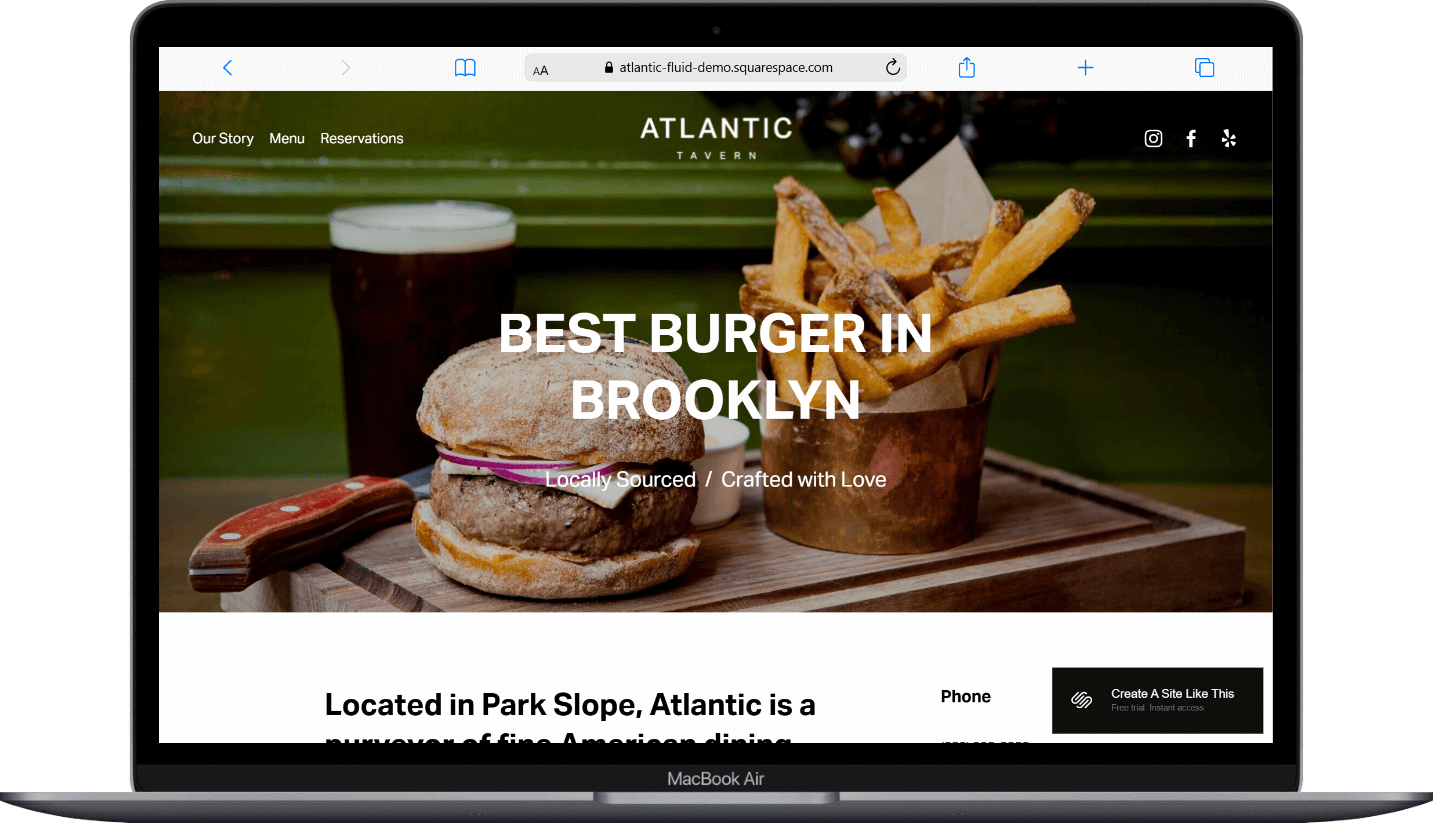
Atlantic is a Squarespace template built for modern restaurants and upscale pubs.
If you're running a restaurant, cafe, or tavern and need a clean site that makes your food the star and gets customers booking tables, Atlantic probably caught your eye for good reason.
This review covers what the Atlantic template includes, pros and cons, where it shines, and where you may hit limitations.
The goal: help you figure out if this free Squarespace website template is the right fit for your restaurant or if you should keep looking.
Who the Atlantic Template Works Best For
Atlantic works well for restaurants that want a modern site with strong imagery and simple, clear navigation.
Cafes and Bistros
Breweries and Bars
Pop-Ups and Food Trucks
Restaurants and GastroPubs
Who the Atlantic Template Is Not Best For
Atlantic is pretty flexible for restaurants, you can really customize it however you need.
The main limitation is that it's a basic free template. Like all free Squarespace templates, it has some constraints - fewer customization options, and unless you really customize fonts, colors, and layouts, your site will look like a lot of other Squarespace sites. If you're looking for something highly customized or truly unique right out of the gate, check out premium templates from designers like Big Cat Creative or Applet Studio, or work with a Squarespace designer who specializes in restaurant sites.
If you need extensive e-commerce for selling products as a main revenue stream (merch, sauces, meal kits), or if you run a catering business needing detailed portfolio pages, Atlantic might feel limited for those purposes.
What You Get with the Atlantic Template
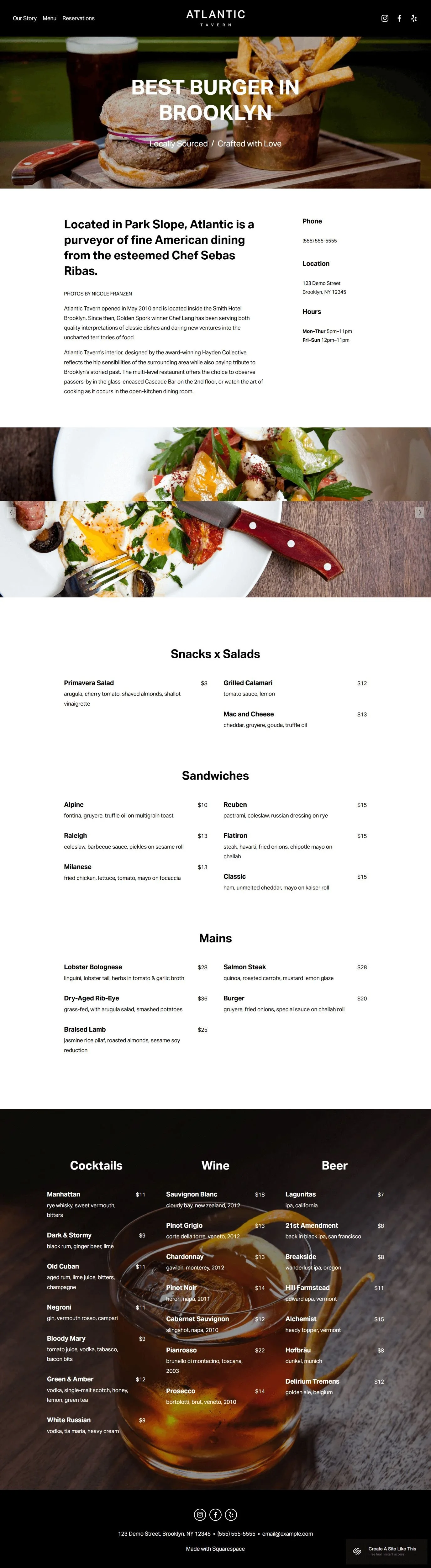
Home Page
Hero image with restaurant name
Introduction text
Image gallery
Contact information and hours
Our Story Page
Your restaurant's background, chef information, or origin story.
Menu Page
Menu categories and items with descriptions and prices.
Reservations Page
Reservation system integration (demo shows Tock) with booking form.
Footer
Contact information, address, phone, email, and social media links.
Like all Squarespace 7.1 templates, you can add or remove pages and customize the structure.
Getting Started with the Atlantic Template is Easy:
Once you select Atlantic from the Squarespace template library:
Update content on all pages - Replace demo text with your actual restaurant information, menu items, and story
Replace images throughout the site - Upload your own photos (make sure they're optimized for web and at least 2000 pixels wide for hero images)
Delete any unused pages - Or move them to "Not Linked" section, disable them, and turn off SEO so they're not accessible until you're ready
Add your favicon and social share image - These show up in browser tabs and when people share your website
Set up SEO - Add meta descriptions and alt text for images. Check your heading hierarchy (make sure your main headline is H1, subheadings follow in order). Squarespace AI can help with meta descriptions and makes it way easy
Customize Site Styles - Change colors, fonts, and buttons to match your brand. Be careful with contrast, especially where text sits over images
Set up your reservation system - Connect Tock, OpenTable, Resy, or your booking system to the reservations page. Test it thoroughly
Update your footer - Add correct contact information, address, phone, email, hours, and link your social media accounts
Test all forms, buttons, and links - Double and triple check to make sure everything works before going live. Preview on mobile
Connect your domain and choose your Squarespace plan, then publish your site 🎉
Atlantic Squarespace Template FAQs
Is the Atlantic template good for SEO?
Yes. Like all Squarespace templates, Atlantic doesn't include proper heading hierarchy by default, which is important for SEO. You'll need to manually set your H1s, H2s, H3s and H4s in logical order. The good news is the template has clean code and loads quickly, which search engines like. You'll have space for page titles, meta descriptions, and alt text on images. But you'll need to do some of the SEO work yourself; the template doesn't do it automatically.
Does the Atlantic template Work on mobile?
Yes. Atlantic is fully responsive and works on phones and tablets. This matters because most people search for restaurants on their phones. The layout adapts so images, menu items, and contact info display properly on small screens. The reservation system works on mobile too, which makes it easy for people to book tables while they're on the go.
Can I change fonts and colors on the Atlantic template?
Yes. You can customize fonts and colors through Squarespace's Site Styles panel. Change your color palette to match your brand, pick different fonts from Squarespace's library or upload custom fonts, and adjust button styles. Just be careful with contrast, especially on pages where text sits over images — you’ll want everything to stay readable.
Does Atlantic work with reservation systems other than Tock?
Yes. The demo shows Tock, but you can integrate other reservation platforms like OpenTable, Resy, or Yelp Reservations. You'll need to embed their booking widget on the reservations page. If you don't use any booking system, you can repurpose that page for contact information or remove it entirely.
Can I add a blog to the Atlantic template?
Yes, but it's not included by default. You can add a blog page through Squarespace's page menu, but you'll need to set up the layout and design yourself. The template doesn't have a blog section built in, so it'll require some extra work to make it look cohesive with the rest of your site.
Can I add more pages to Atlantic?
Yes. While the demo includes four pages, you can add as many pages as you want through Squarespace. You could add pages for events, catering, private dining, or anything else. Just know that Atlantic's navigation is designed to be simple, so adding too many pages might require adjusting the header menu layout.
Do I need a Squarespace account to use Atlantic?
Yes. Atlantic is a Squarespace template, so you need a Squarespace subscription to use it. You can start with a free trial to test it out, then upgrade to a paid plan when you're ready to launch. Plans start at the Basic level, but if you want the reservation system or need to remove Squarespace branding, you'll need a Core plan or higher. See my Squarespace pricing and plans breakdown here.
Can I use Atlantic for a bar or brewery instead of a restaurant?
Yep. The template works well for any food and beverage business. The menu page adapts easily to showcase drinks instead of food; just change the category headers (Cocktails, Beer, Wine, etc.). The layout and structure work the same way whether you're highlighting burgers or bourbon.